Business and ERP
Getting Started with ERPNext: A Complete Guide to Free Open Source Cloud ERP for Homelabs
By Amjid Ali · · Updated · 2 min read

In this article
- Why Choose ERPNext for Your Homelab?
- Key Features That Make ERPNext Exceptional
- Deployment Options for Homelab Environments
- Essential Modules to Explore First
- Integration with Your Existing Workflow Tools
- Getting Started: Installation Guide
- Related Articles You May Like
- Enhance Your ERPNext Experience
- Conclusion: Transform Your Homelab with Enterprise ERP
Are you looking for enterprise-grade ERP capabilities without the enterprise price tag? In this comprehensive guide, we’ll explore ERPNext – the powerful free open source cloud ERP software built on the Frappe framework that’s perfect for homelab enthusiasts and IT professionals. You’ll learn how to deploy, configure, and leverage this robust business management platform to streamline your operations, automate workflows, and gain enterprise-level functionality for your personal projects or small business – completely free of charge.
Why Choose ERPNext for Your Homelab?
ERPNext stands out as one of the most comprehensive open source ERP solutions available today. Built on the Python-based Frappe framework, it offers a modular architecture that includes accounting, inventory management, CRM, HR, manufacturing, and much more. What makes it particularly appealing for homelab users is its cloud-native design and zero licensing costs.
Key Features That Make ERPNext Exceptional
- Complete Business Suite: From accounting and inventory to project management and CRM
- Cloud-Ready Architecture: Deploy on-premise or in your preferred cloud environment
- Mobile Responsive: Access your ERP system from any device
- Customizable Workflows: Tailor processes to match your specific requirements
- Multi-company Support: Manage multiple business entities from a single installation
Deployment Options for Homelab Environments
ERPNext offers multiple deployment methods perfect for homelab setups. You can install it on Ubuntu servers, deploy via Docker containers, or even set it up on Proxmox virtual machines. The flexibility ensures you can integrate it seamlessly with your existing homelab infrastructure.
Essential Modules to Explore First
- Accounting: Complete double-entry bookkeeping with financial statements
- Inventory Management: Track stock levels, warehouses, and inventory valuation
- CRM: Manage customer relationships and sales pipelines
- HR Management: Employee records, payroll, and attendance tracking
- Project Management: Plan, track, and manage projects with Gantt charts
Integration with Your Existing Workflow Tools
One of ERPNext’s strengths is its ability to integrate with other tools. You can connect it with n8n workflow automation platforms, sync data with various cloud services, and even automate processes using its robust API. This makes it an ideal centerpiece for a comprehensive homelab automation ecosystem.
Getting Started: Installation Guide
The easiest way to start with ERPNext is using the Frappe Bench tool, which handles dependencies and setup automatically. For homelab users familiar with Linux environments, the process is straightforward and well-documented in the official ERPNext documentation.
Related Articles You May Like
- Open Source Solutions for Enterprise IT
- Workflow Automation Best Practices
- Enterprise IT Management Strategies
Enhance Your ERPNext Experience
For those looking to extend ERPNext’s capabilities, consider exploring integration with n8n workflow automation to create custom automations and connect with other services in your homelab environment.
Conclusion: Transform Your Homelab with Enterprise ERP
ERPNext proves that enterprise resource planning doesn’t have to be complex or expensive. With its open source nature, cloud capabilities, and comprehensive feature set, this Frappe-based solution offers homelab users and tech enthusiasts unparalleled flexibility and power. Whether you’re managing personal projects, testing business concepts, or building your IT skills, ERPNext provides a professional-grade platform at zero cost. Ready to transform your homelab into a fully-functional enterprise environment? Start your ERPNext journey today and experience the power of free open source cloud ERP software firsthand!
Related videos
Video library- Cloud and Self-Hosting
The Ultimate Proxmox UI Tutorial: Full Walkthrough for Getting Started
· 30:31 · 3.9K views
Watch on YouTube - Business and ERP
ERPNext 15 Installation on Ubuntu 22.04 with HRMS: Step-by-Step
· 11:32 · 23K views
Read the guide Watch on YouTube - Business and ERP
ERP Next Installation Tutorial on VM // Proxmox Ubuntu 18.04 Virtual Appliance
· 8:02 · 8.4K views
Watch on YouTube
Keep reading
 Business and ERPFrappe & ERPNext: The Ultimate Free and Open-Source Enterprise Solution for HomelabsDiscover how Frappe & ERPNext can revolutionize your homelab or IT infrastructure with its powerful, free, and open-source enterprise solutions. Whether... · 1 min read
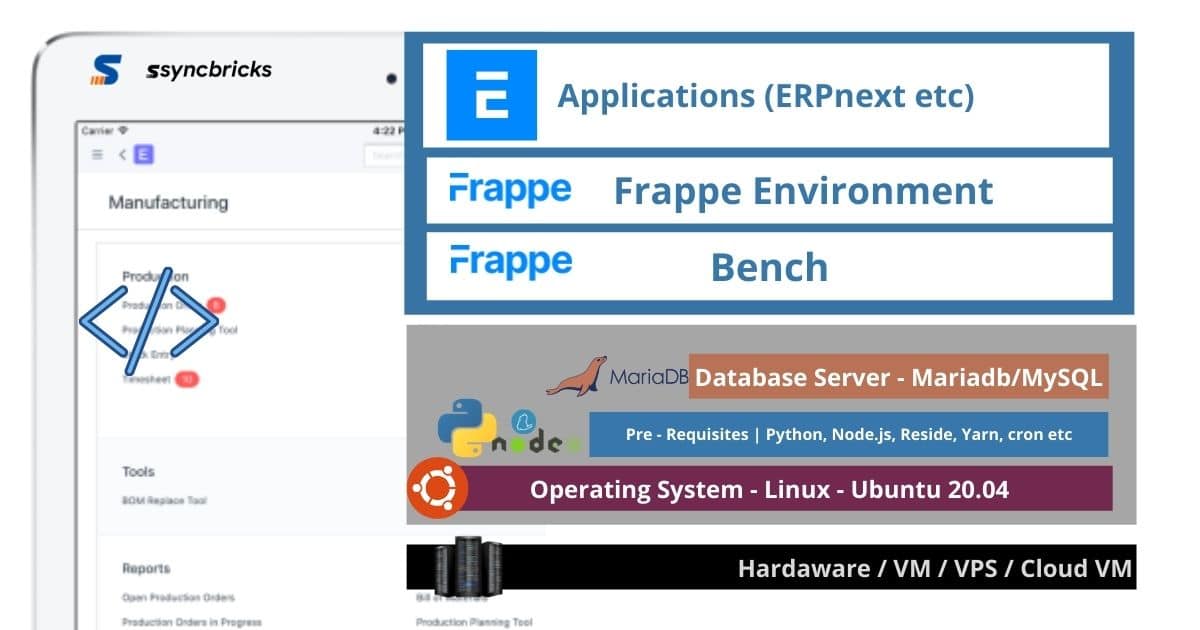 Business and ERPERPNext Install Ubuntu 20.04 – Manual Step by StepComplete guide for EPRNext Install on Ubuntu 20.04 Step by Step installation of Server, Bench, Frappe, ERPNext, SSL and Production. · 12 min read
 Business and ERPHow to Install ERPNext on Ubuntu 18.04First Install Ubuntu Server from Blow provided link https://syncbricks.com/ubuntu-server-18-04-install/ ERPNext Easy Install To install ERPNext using th... · 1 min read