Networking and Security
What Is OpenWrt? The Open Source Router OS Explained, With Real Screenshots (2026)
By Amjid Ali · · 8 min read
In this article
- What is OpenWrt?
- Why open source matters for your router
- How OpenWrt works: the five things to understand
- The command line: UCI (and why it suits automation)
- Backups and upgrades
- What hardware does OpenWrt run on?
- How I use OpenWrt in my home lab
- OpenWrt vs pfSense vs OPNsense
- Things to know before you install OpenWrt
- Learn more: my firewall and home lab courses
- FAQ
OpenWrt is a free, open source operating system for routers. It replaces the firmware your router shipped with, the software your ISP or the manufacturer controls, with a full Linux system that you control: your own firewall rules, VLANs, VPNs, ad-blocking and updates long after the vendor has moved on. In this guide I explain what OpenWrt is, why open source matters for the box that sits between your family and the internet, how OpenWrt actually works, and how I run it in my home lab, with real screenshots from my own install.
What is OpenWrt?
In the project's own words, OpenWrt is "a highly extensible GNU/Linux distribution for embedded devices (typically wireless routers)". The key difference from normal router firmware is in the design:
- Normal router firmware is one sealed image. You get the features the vendor chose, the settings page they built, and updates for as long as they feel like it.
- OpenWrt gives you a writable filesystem and a package manager. You start with a lean router and add exactly what you need: a VPN server, DNS filtering, traffic shaping, monitoring, a second Wi-Fi network for guests.
The project started in January 2004, built from the GPL source code Linksys released for its famous WRT54G router. In 2016 a group of developers forked it as LEDE, and the two projects merged back under the OpenWrt name in 2018. Today it runs on a huge range of hardware, from cheap travel routers to x86 PCs, Raspberry Pis and high-end boards like the Banana Pi BPI-R4 Pro.
Why open source matters for your router
Your router sees every connection your household makes. That makes "who controls its software" a security question, not just a hobby one.
- You can see what it does. OpenWrt is open source, so its code is public and reviewed by developers around the world. OpenWrt's own page puts it simply: "No hidden backdoors left by hardware vendors."
- No vendor background processes. OpenWrt notes that it ships without the extras many vendor firmwares carry, such as remote diagnostics, analytics and auto-update agents.
- Updates outlive the vendor. Routers are often abandoned after a few years of updates. OpenWrt keeps many older devices supported and patched long after the manufacturer stops.
- Safe defaults. The default configuration lets you browse the internet while blocking everything coming in, so a fresh install isn't exposing your network.
- No cloud account, no subscription. Everything runs on the router itself. Nothing needs to phone home for you to change a setting.
- It's free. OpenWrt costs nothing and is licensed as free software (the GPL), so anyone can study, change and share it.
How OpenWrt works: the five things to understand
1. LuCI, the web interface
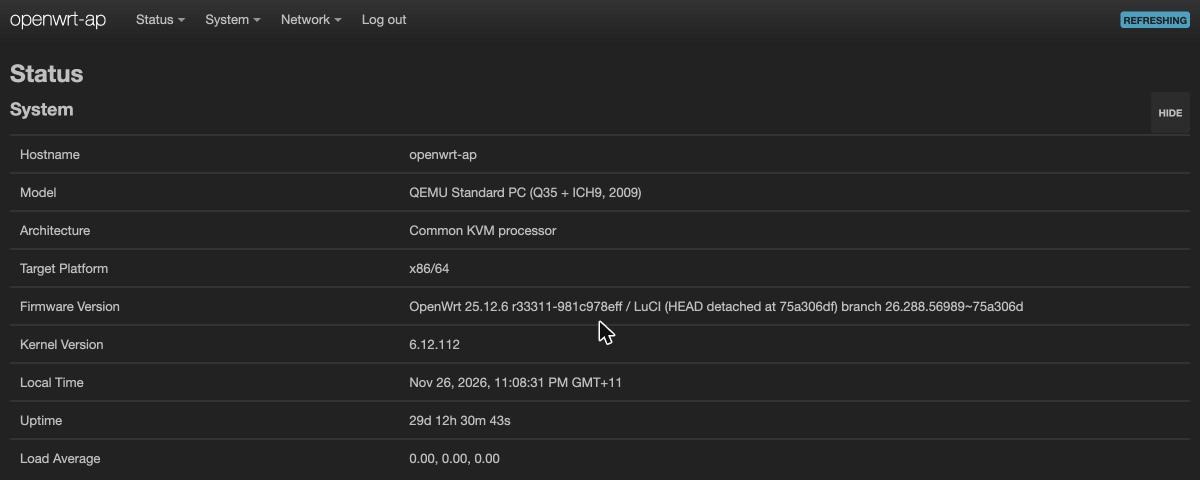
LuCI is OpenWrt's web interface. You open your router's address in a browser and get menus for Status, System and Network. Everything above and below this paragraph is a real LuCI screen from my own OpenWrt.
2. Interfaces and devices
OpenWrt separates devices (physical ports, bridges, VLANs) from interfaces (networks with an address). A bridge called br-lan joins your LAN ports and Wi-Fi into one network; wan faces the internet.
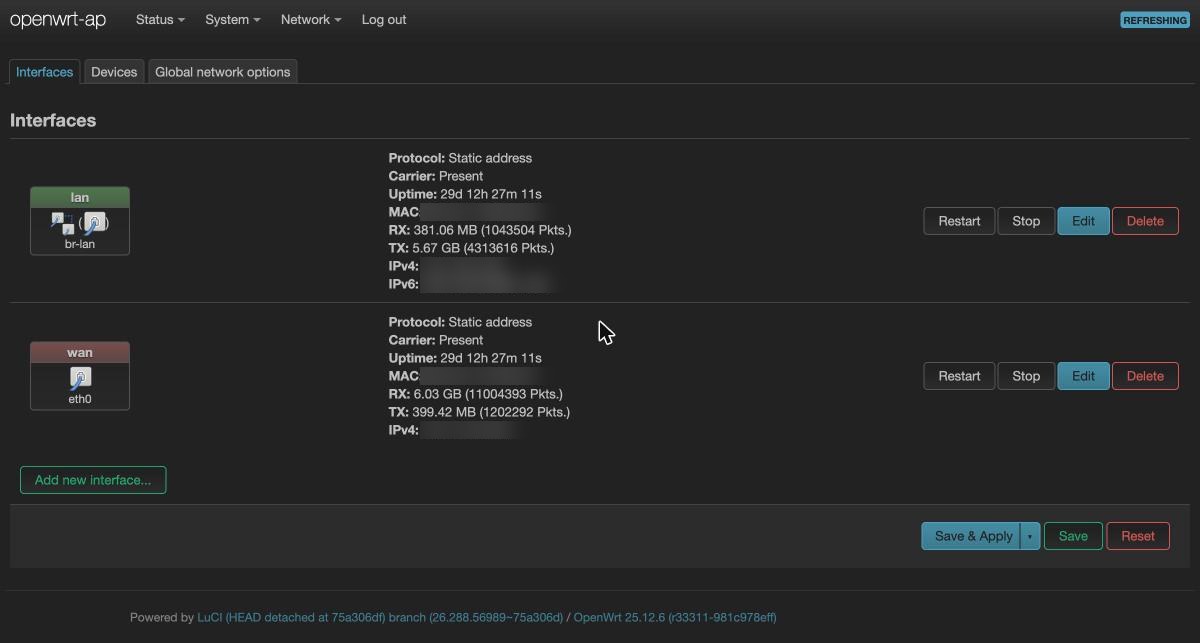
On my install you can see the two classic interfaces: lan (green) on the bridge br-lan, and wan (red) on eth0. The colour shows which firewall zone each one belongs to. (I've blurred the addresses.)
3. Firewall zones: the heart of OpenWrt security
This is the part that makes OpenWrt click. Instead of writing hundreds of individual rules, you group networks into zones and set a policy for each one:
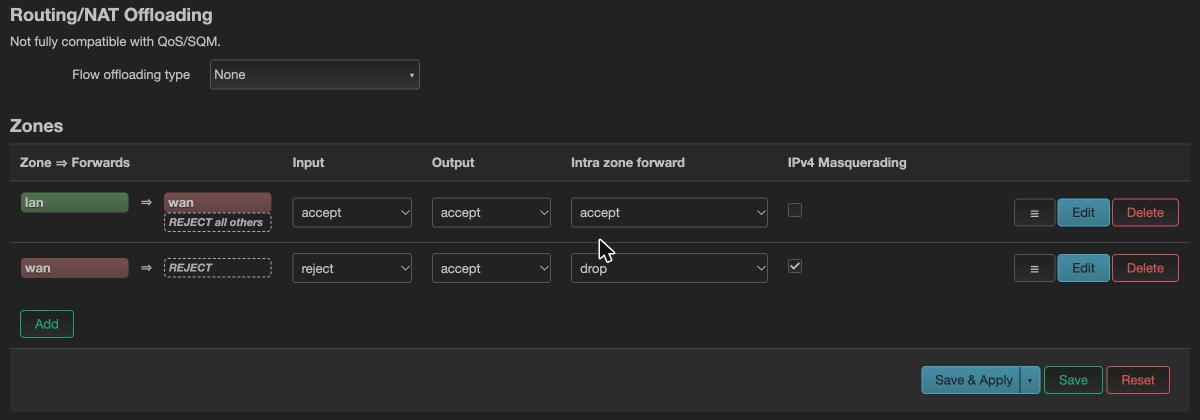
- lan → wan: devices on the LAN may go out to the internet; everything else is rejected.
- wan: incoming connections are rejected, forwarding is dropped, and masquerading (NAT) is on, so all your devices share one public address.
Want a separate network for guests or smart devices? Add a zone (say iot), allow iot → wan only, and those devices can reach the internet but never your laptop or NAS. Under the hood OpenWrt's firewall (fw4) uses Linux nftables, and it validates the whole ruleset before loading it.
4. Traffic rules: the exceptions
Rules are the exceptions to zone policy, checked from top to bottom: allow DHCP renewals and ping, open one port, or block something at a certain time.
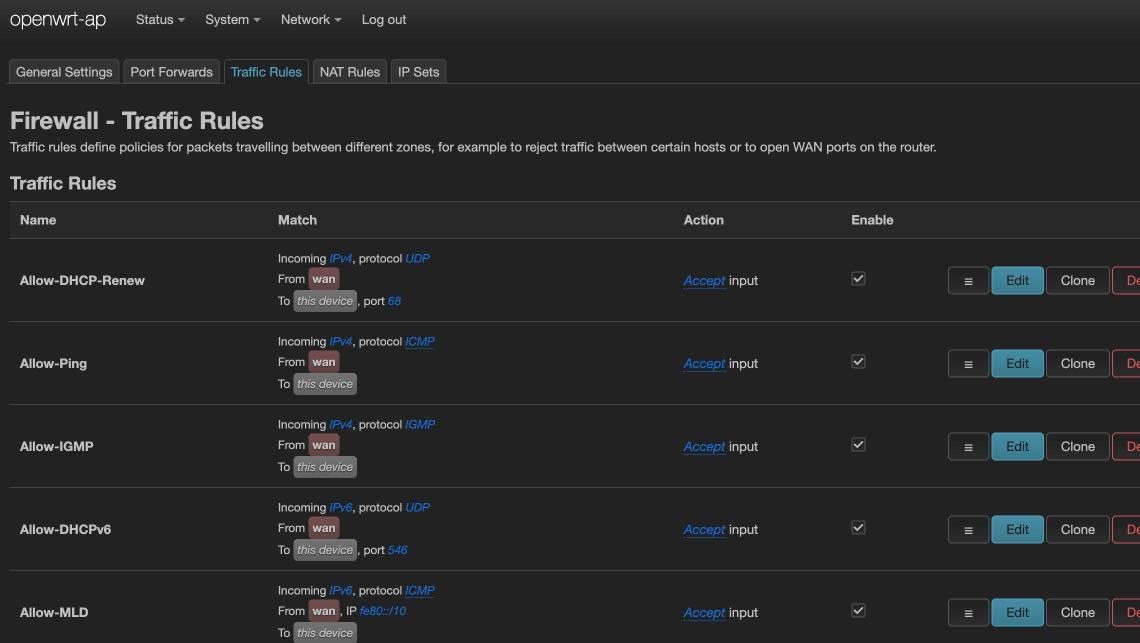
Rules can also be time-based (weekdays, start and stop times), which is how you build a "no internet on the kids' network after 23:00" rule. One tip if you do: a block rule stops new connections, so pair it with a scheduled job that clears existing ones at the start time.
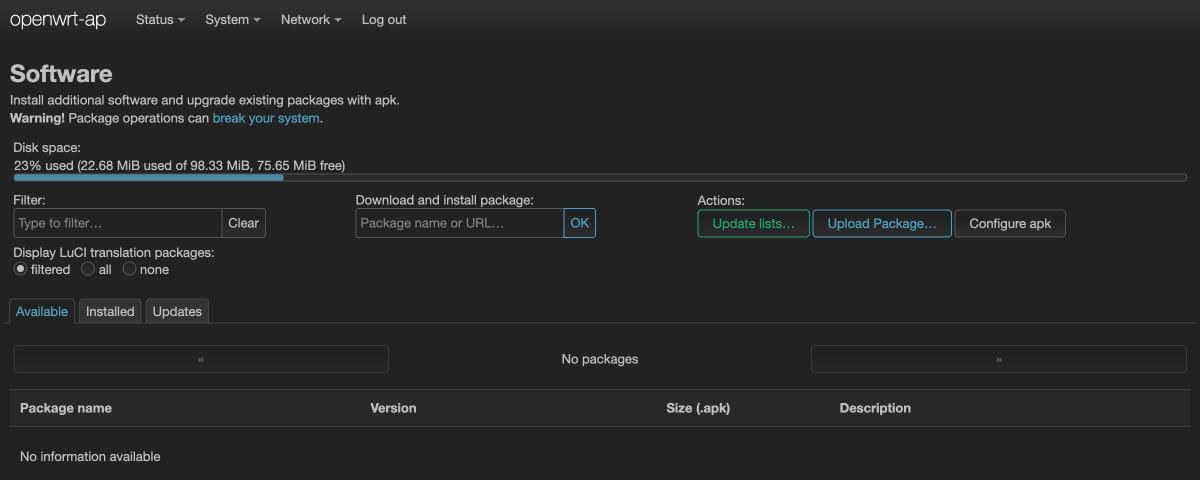
5. Packages and apk
OpenWrt 25.12 switched its package manager to apk (the same tool Alpine Linux uses). From LuCI's Software page or the command line you can add features in seconds: apk add luci-proto-wireguard for WireGuard, apk add adguardhome for DNS filtering, apk add luci-app-sqm to fix bufferbloat.
The command line: UCI (and why it suits automation)
Everything you click in LuCI is stored in plain text files in /etc/config/ and managed with a tool called UCI:
uci show firewall                          # print the whole firewall config
uci set firewall.@zone[1].input='REJECT'   # stage a change
uci changes                                # see what will change
uci commit firewall && service firewall reload
Two features make this powerful for careful admins, and for AI-assisted management:
- Changes are staged.
uci changesshows the exact diff before anything goes live. - Apply with automatic rollback. OpenWrt can apply a change with a timer and undo it by itself if you don't confirm it, for example because the change cut off your access. LuCI uses this, and it's available from the command line too.
That's why I manage my OpenWrt mostly from the CLI: the configuration is short, readable text that can live in git, and every change can be reviewed before it's applied.
Backups and upgrades
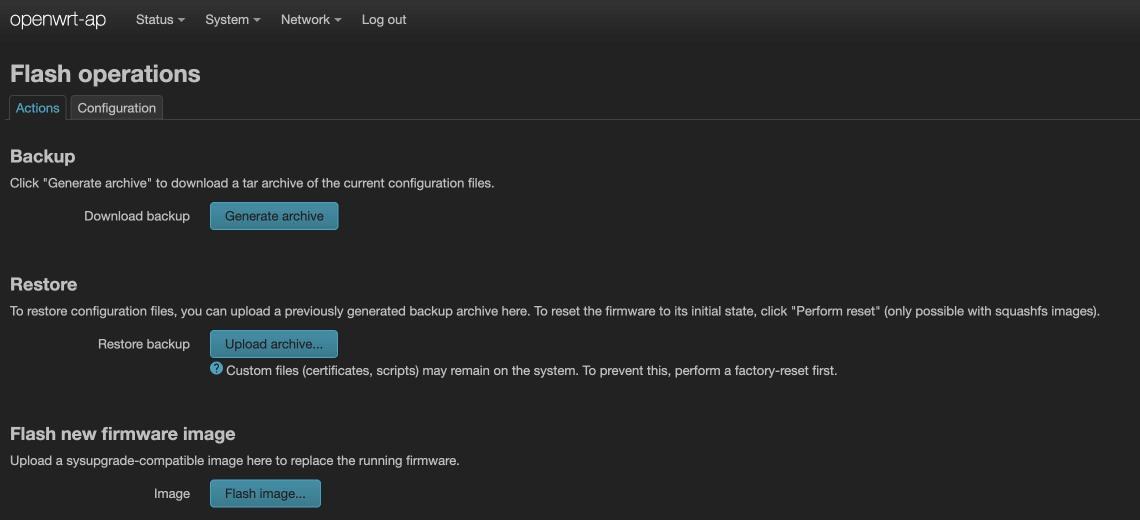
System → Backup / Flash Firmware is your safety net. "Generate archive" downloads your whole configuration as one small file; "Flash image" upgrades OpenWrt and keeps your settings. Take a backup before every change and keep a copy off the router.
What hardware does OpenWrt run on?
- Consumer routers: a long list of models from many brands. Always check the device is listed in OpenWrt's Table of Hardware before buying, and check the exact hardware version.
- Router boards built for it: MediaTek-based boards such as the Banana Pi BPI-R3, BPI-R4 and BPI-R4 Pro, and the OpenWrt One.
- x86 PCs and virtual machines: an old mini PC, or a VM on Proxmox (that's how mine runs).
- Raspberry Pi: the Pi 3, 4 and 5 are supported. They have one Ethernet port and a weak built-in Wi-Fi radio, so they make better lab or travel routers than main Wi-Fi routers.
The easiest way to find the right image is the OpenWrt Firmware Selector at firmware-selector.openwrt.org.
How I use OpenWrt in my home lab
My OpenWrt runs as a small virtual machine on a Proxmox server, version 25.12.6 at the time of writing. It routes a separate Wi-Fi network for my AI lab: the Proxmox host runs the radio, OpenWrt hands out addresses, forwards DNS to my Pi-hole, and keeps that network firewalled from the rest of the house. It uses about 70 MB of memory and has been running for a month without a restart.
Next, it's getting a big brother: a Banana Pi BPI-R4 Pro with Wi-Fi 7. The plan is to use OpenWrt there as a Wi-Fi 7 access point with separate VLANs for family, kids, smart devices and guests, next to my pfSense firewall, and later possibly as the main router.
OpenWrt vs pfSense vs OPNsense
| OpenWrt | pfSense / OPNsense | |
|---|---|---|
| Base | Linux | FreeBSD |
| Runs on | Routers, Arm boards, x86, Raspberry Pi | x86 PCs and appliances |
| Wi-Fi | Excellent: built for Wi-Fi routers | Not really (use a separate access point) |
| Firewall features | Zones, rules, VLANs, VPN, DNS filtering via packages | Richer out of the box: aliases, URL tables, captive portal, IDS packages |
| Best for | Wi-Fi routers, access points, low-power boards | Dedicated x86 firewalls |
They're complementary, not rivals. Many home labs (mine included) run pfSense or OPNsense on an x86 box as the firewall and OpenWrt on the Wi-Fi hardware. For a wider comparison, see the best open source firewalls of 2026 and pfSense vs OPNsense.
Things to know before you install OpenWrt
- Check support first. Flashing the wrong image can brick a device. Use the exact model and hardware revision.
- Stable vs snapshot. Stable releases (like 25.12.x) are for everyday use. Snapshots are daily development builds: newer hardware support, but less tested, and LuCI isn't included by default.
- Some vendor features don't carry over. Proprietary extras like a manufacturer's mesh app or cloud parental controls won't exist; you rebuild them with OpenWrt's own tools.
- Wi-Fi performance depends on drivers. On some chips, vendor firmware is faster at first; on most, OpenWrt matches or beats it.
Learn more: my firewall and home lab courses
If you want to go deeper on the firewalls and the home lab platform mentioned here, these are my own step-by-step courses on Udemy:
- pfSense: Network Security and Firewall Management: install pfSense and build rules, VLANs, VPNs and filtering from scratch.
- OPNsense Firewall: Complete Guide to Network Security: the open source pfSense alternative, from install to intrusion prevention.
- Network Security with Arista (Untangle) NG Firewall: Arista's Edge Threat Management (formerly Untangle) next-generation firewall.
- Proxmox VE 9 Mastery: Virtualization, Clustering, Ceph & AI: the platform my OpenWrt VM and home lab run on.
- Proxmox VE: Build a High Availability Cluster with Ceph (Lab): a hands-on HA cluster with Ceph storage.
FAQ
Is OpenWrt free? Yes. OpenWrt is free and open source software. There's no licence fee or subscription.
Is OpenWrt secure? Its code is public and widely reviewed, it ships with a conservative default firewall, and it keeps getting updates for devices vendors have abandoned. As with any router, security depends on staying updated and configuring it carefully.
Can I install OpenWrt on my existing router? If your exact model and hardware version are in OpenWrt's Table of Hardware, usually yes. Follow the device's install instructions on the OpenWrt wiki.
Is OpenWrt better than my ISP's router? For control, privacy and updates, almost always. You get a real firewall, VLANs, VPN and no vendor cloud. The trade-off is that you manage it yourself.
Can OpenWrt run Pi-hole? Pi-hole doesn't officially support OpenWrt. Use AdGuard Home (an official OpenWrt package) on the router, or point OpenWrt's DNS at a Pi-hole on another device, which is what I do.
What is LuCI? LuCI is OpenWrt's web interface. You can do everything without it from the command line with UCI, and on development snapshots LuCI has to be installed separately.
Sources: openwrt.org (About the OpenWrt/LEDE project, Reasons to use OpenWrt, OpenWrt version history); screenshots from my own OpenWrt 25.12.6 install, with private addresses blurred.
Keep reading
 Networking and SecurityBanana Pi BPI-R4 Pro Review: Wi-Fi 7 OpenWrt Router Board, In-Depth Guide (2026)Banana Pi BPI-R4 Pro in depth: MT7988A specs, 4E vs 8X, Wi-Fi 7 BE14, 10G SFP+, OpenWrt on SD, NAND and eMMC, real uses, limits, price and who should buy it. · 15 min read
 Networking and SecuritypfSense vs OPNsense (2026): Which Open Source Firewall to ChoosepfSense vs OPNsense in 2026: OPNsense ships fully open, frequent releases; pfSense CE stays free and Plus fits Netgate hardware. Here is which to choose. · 11 min read
 Networking and SecurityBest Next-Generation Firewalls (NGFW) in 2026: Vendors Compared for SMB and EnterpriseBest next-generation firewalls in 2026: Palo Alto, Fortinet, Check Point, Cisco, Juniper, Sophos and SonicWall compared, with test results and how to choose. · 11 min read