Networking and Security
Banana Pi BPI-R4 Pro Review: Wi-Fi 7 OpenWrt Router Board, In-Depth Guide (2026)
By Amjid Ali · · 15 min read
In this article
- Banana Pi BPI-R4 Pro at a glance
- What is the Banana Pi BPI-R4 Pro?
- BPI-R4 Pro 4E vs 8X: which version?
- What's in the BPI-R4 Pro 4E kit?
- Hardware tour
- The Wi-Fi 7 card: BPI-R4-NIC-BE14
- eMMC, NAND, microSD and NVMe: what each one is for
- Firmware: OpenWrt, and why not pfSense or OPNsense?
- What can you use the BPI-R4 Pro for?
- How to install OpenWrt on the BPI-R4 Pro
- Known limitations
- Who should buy it, and who shouldn't
- Alternatives
- Price and where to buy
- Learn more: my firewall and home lab courses
- FAQ
- What's next
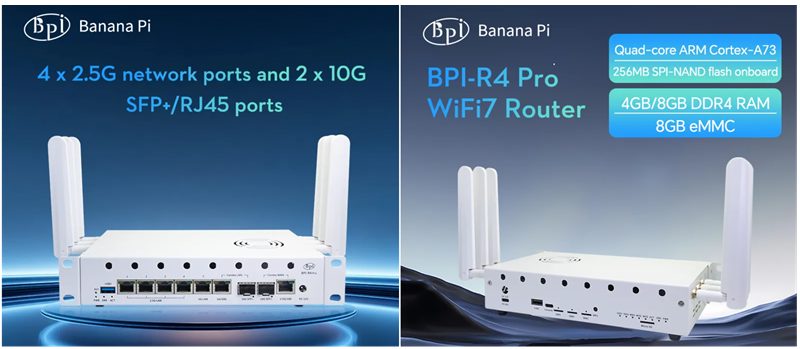
The Banana Pi BPI-R4 Pro is an open-source router board built on MediaTek's Filogic 880 (MT7988A) chip, with 10G SFP+, four 2.5G ports, a tri-band Wi-Fi 7 card and slots for NVMe and 4G/5G modules. It's for people who want to build a router they fully control with OpenWrt, instead of living with whatever their ISP router allows. This guide covers everything you need to decide: what it is, the 4E and 8X versions, what's in the kit, what you can use it for, how OpenWrt gets onto it, and the honest limitations.
Disclosure and status: Banana Pi is sending SyncBricks a BPI-R4 Pro 4E kit for review. They have not paid for this article or seen it before publishing. This in-depth guide is based on Banana Pi's official documentation, the OpenWrt project's own build list and independent reviews, all read on 26 November 2026. Our hands-on test results (speeds, Wi-Fi 7, power and temperatures) and the full video tutorial will be added here once our unit arrives. Product images: Banana Pi (CC BY-SA).
Banana Pi BPI-R4 Pro at a glance
| Chip | MediaTek MT7988A (Filogic 880), quad-core Arm Cortex-A73 at 1.8 GHz |
| Versions | 4E (4 GB RAM) and 8X (8 GB RAM) |
| Storage | 8 GB eMMC, 256 MB SPI-NAND, microSD slot, 2x M.2 NVMe |
| Network (4E) | 2.5G RJ45 WAN or 10G SFP+ WAN, 10G SFP+ LAN, 4x 2.5G LAN, 2x 1G LAN |
| Wi-Fi | BPI-R4-NIC-BE14 Wi-Fi 7 card: 2.4, 5 and 6 GHz, up to 320 MHz channels |
| Expansion | 3x M.2 B-key for 4G/5G modules, USB 3.2, 26-pin GPIO |
| Power | 12 V DC barrel or USB-C PD 20 V |
| Software | OpenWrt (official snapshot builds, Banana Pi's own OpenWrt 24.10 image), BpiRouterOS, Debian |
| Kit price | USD 384 for the complete 4E kit on Banana Pi's official shop (checked 26 Nov 2026) |
Short verdict (pre-test): on paper, no consumer router gives you this mix of 10G, 2.5G, Wi-Fi 7, NVMe and 5G expansion with fully open firmware. The catch is software maturity: official OpenWrt support for the Pro is still in development builds, so it rewards people who are comfortable with OpenWrt and a serial console. If you want plug-and-play mesh Wi-Fi with an app, this isn't it.
What is the Banana Pi BPI-R4 Pro?
Banana Pi makes single-board computers and router boards. The R series is its networking line, built on MediaTek's router chips: the BPI-R3 (Filogic 830), the BPI-R4 (Filogic 880) and now the BPI-R4 Pro, an upgraded R4 on the same Filogic 880 platform. MediaTek positions Filogic 880 as a platform for 36 Gbps Wi-Fi 7 access points and gateways, with features like 320 MHz channels, 4096-QAM, Multi-Link Operation (MLO) and a dedicated tunnel offload engine (TOPS). Banana Pi's own note is worth repeating: some of these functions "require continuous software updates and improvements".
Open source, hardware and software. "Open source" here means more than the firmware. Banana Pi publishes the BPI-R4 Pro's schematic, assembly drawing, DXF and 3D files, and its OpenWrt source code on GitHub, all linked from its documentation. The main firmware, OpenWrt, is free and open source too, so you can see exactly what runs on the box between your network and the internet: no vendor cloud, no hidden background services, and updates that don't depend on the manufacturer's goodwill.
Compared with the original BPI-R4, the Pro upgrades the four gigabit ports to 2.5G, adds a second NVMe slot and three slots for cellular modules, and on the 8X adds 10G copper ports next to the SFP+ cages.
BPI-R4 Pro 4E vs 8X: which version?
Both versions share the same chip, storage and expansion. The difference is memory and the 10G copper ports.
| BPI-R4 Pro 4E | BPI-R4 Pro 8X | |
|---|---|---|
| RAM | 4 GB DDR4 | 8 GB DDR4 |
| WAN | 2.5G RJ45 or 10G SFP+ (combo, one at a time) | 10G RJ45 or 10G SFP+ (combo) |
| LAN | 10G SFP+, 4x 2.5G RJ45, 2x 1G RJ45, 1x 1G (FPC connector) | 10G RJ45 or 10G SFP+ (combo), 4x 2.5G RJ45, 1x 1G RJ45, 1x 1G (FPC) |
| Switching combo ports | In U-Boot (a one-line setting) | Automatic, depending on what you plug in |
| Weight | about 210 g | about 220 g |
| Board size | 132 x 194 mm | 132 x 194 mm |
Which to choose: the 4E is enough for almost every home and small office. Even a 1 Gb/s internet plan won't stretch it, and 4 GB is plenty for OpenWrt with VPN, ad-blocking and monitoring. Pick the 8X if you have 10G copper (RJ45) devices you want to plug straight in, or you plan to run containers that need the extra memory.
What's in the BPI-R4 Pro 4E kit?
Banana Pi's "complete assembly package" for the 4E includes:
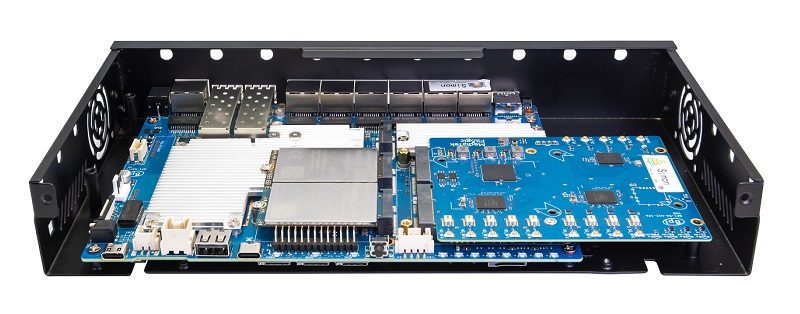
- The assembled unit: the BPI-R4 Pro 4E with two heatsinks, the BPI-R4-NIC-BE14 Wi-Fi 7 card, a cooling fan for the Wi-Fi card, a 4010 cooling fan, the white sheet-metal enclosure and internal antenna cables
- A set of six rubber antennas
- An Ethernet cable
- A 12 V 5 A power adapter (EU or US plug)
- Screws
Not included: a microSD card, an NVMe SSD and SFP+ modules. Buyers in Australia, the UK and other regions will need a plug adapter, or can power the board from a USB-C PD 20 V charger instead.
Hardware tour
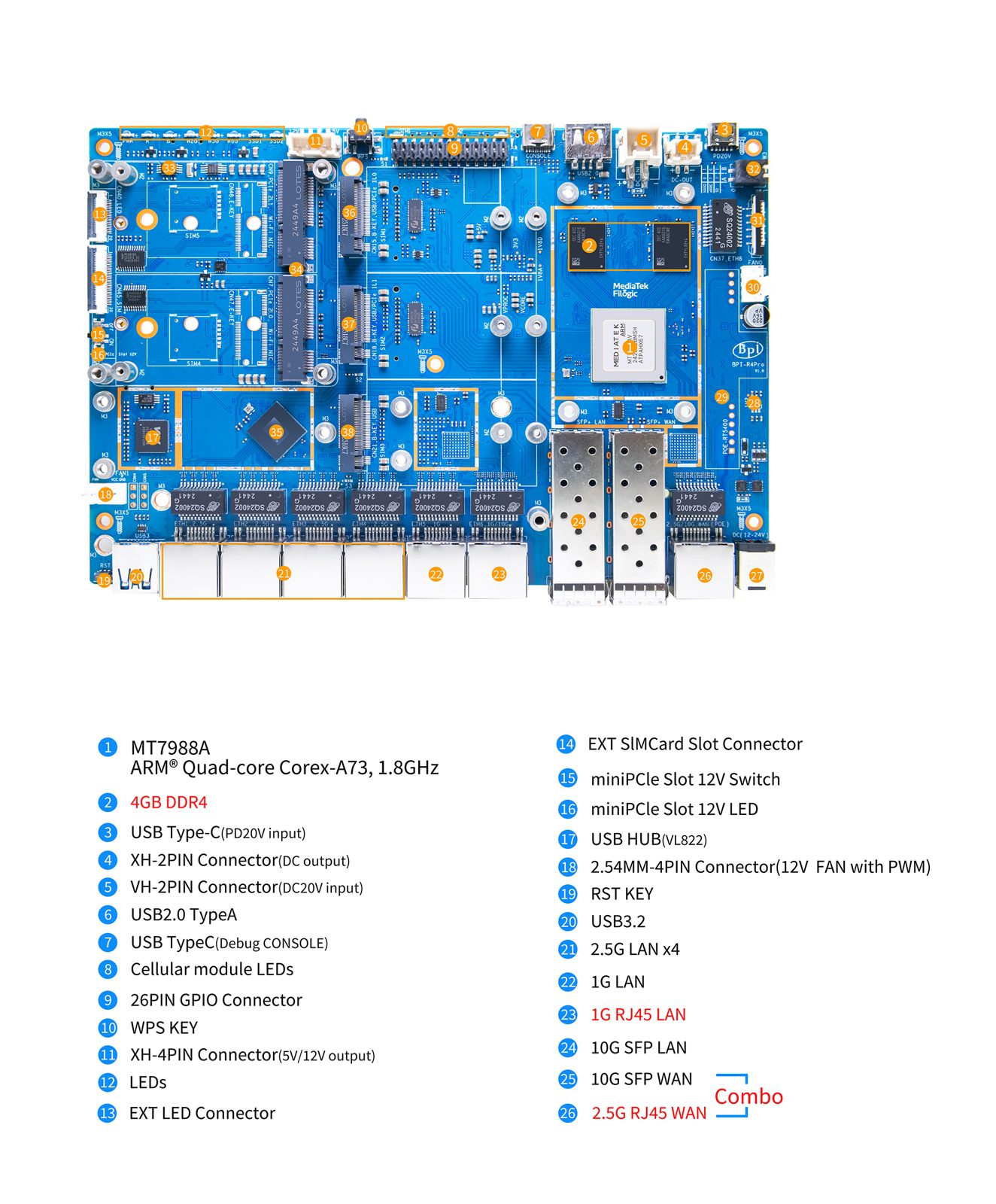
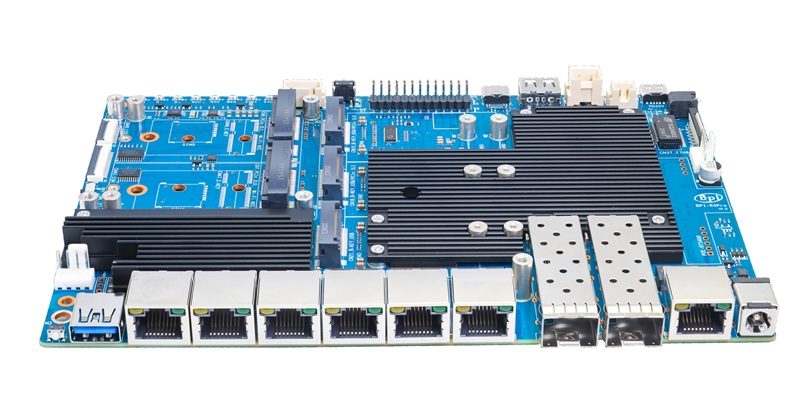
The top of the board holds the MT7988A under its heatsink, the MaxLinear MxL86252C switch chip that runs the 2.5G ports, the port row (RJ45 and the two SFP+ cages), the USB ports, the 26-pin GPIO header, two PWM fan headers and an RTC battery holder. The bottom carries the two miniPCIe slots for the Wi-Fi card, the M.2 slots, the microSD slot and the SIM slots.
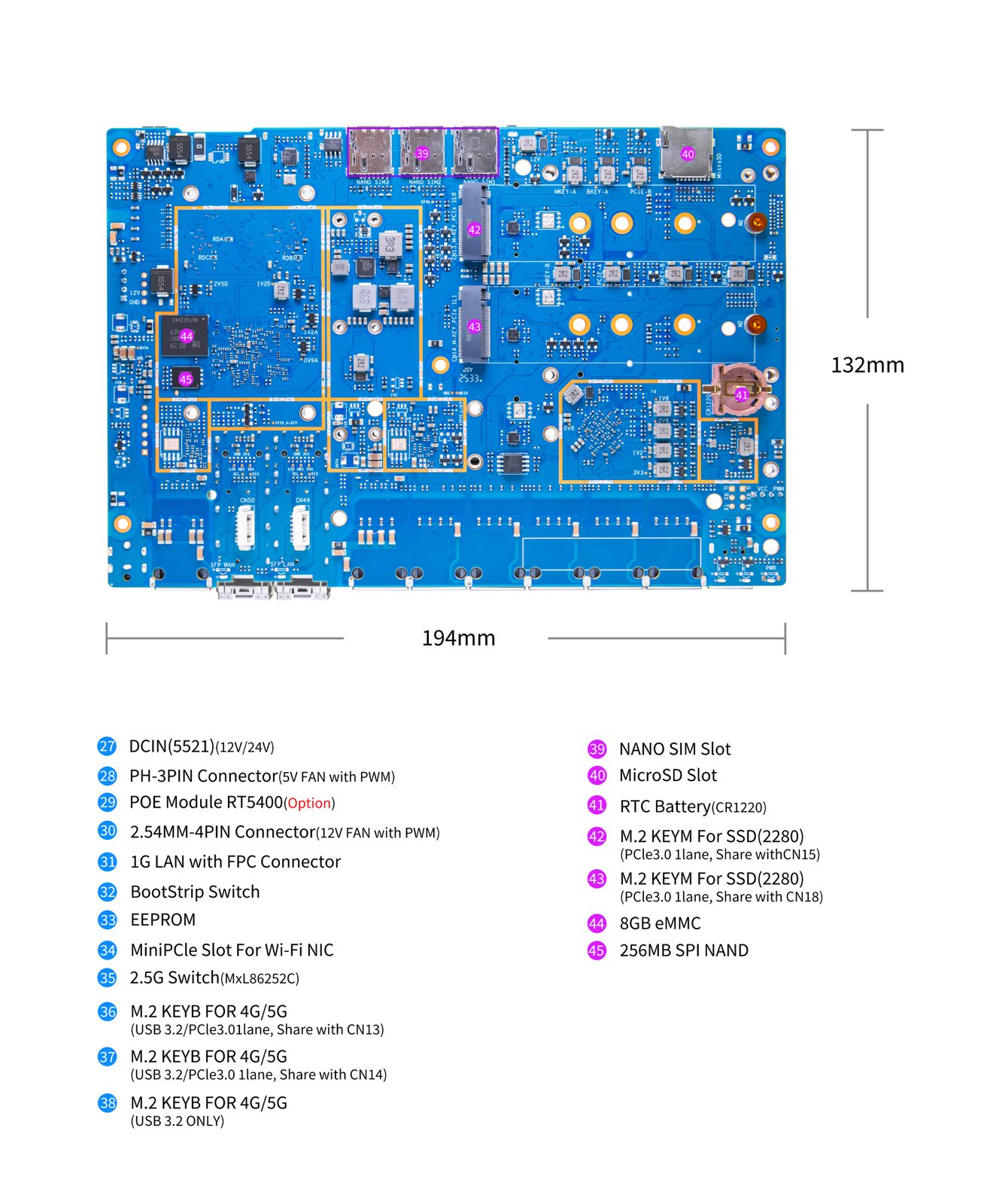
Useful details from the documentation:
- 10G SFP+ ports run at a fixed 10 Gb/s, so only 10G modules work. Independent testing by Interfacing Linux found 1G and 2.5G copper SFP modules didn't link, while 10G fibre modules worked. 10G copper SFP+ modules work but run hot.
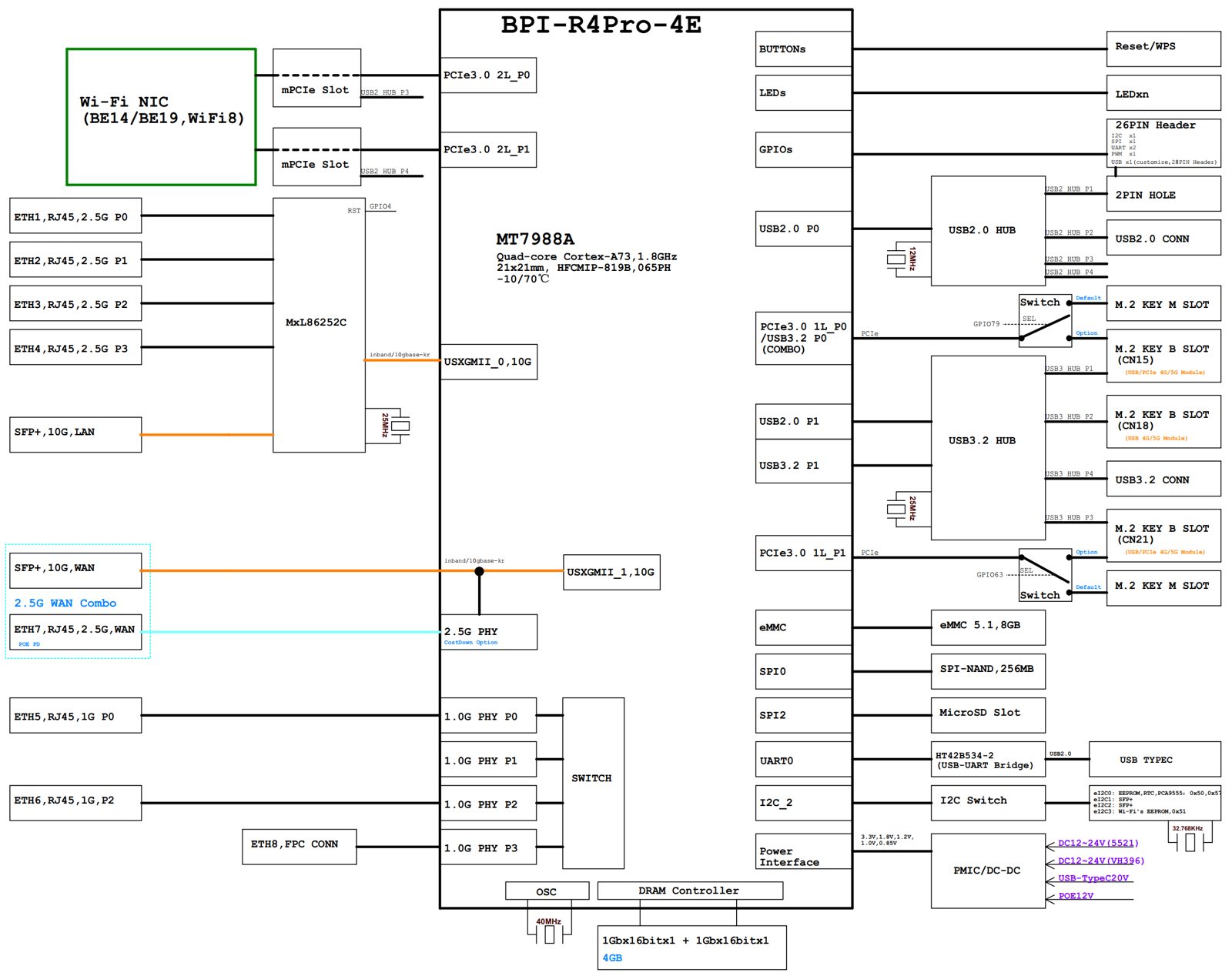
- The "WAN" and "LAN" labels are just defaults. In OpenWrt any port can take any role, so the 4E can use both SFP+ ports at 10G if your internet comes in on a 2.5G port.
- Debug console: a USB-C port gives you a serial console (115200 baud) on any computer, so you can watch it boot and recover it without a network connection.
- Power: Banana Pi says the bare board draws about 10 W. Interfacing Linux measured just under 12 W idle with the Wi-Fi card fitted on an 8X, and about 13 W under load. That's less than most mini PCs used as routers.
- Cooling: two PWM fan headers (12 V, 4-pin PC style). The kit comes with both fans fitted.
The Wi-Fi 7 card: BPI-R4-NIC-BE14
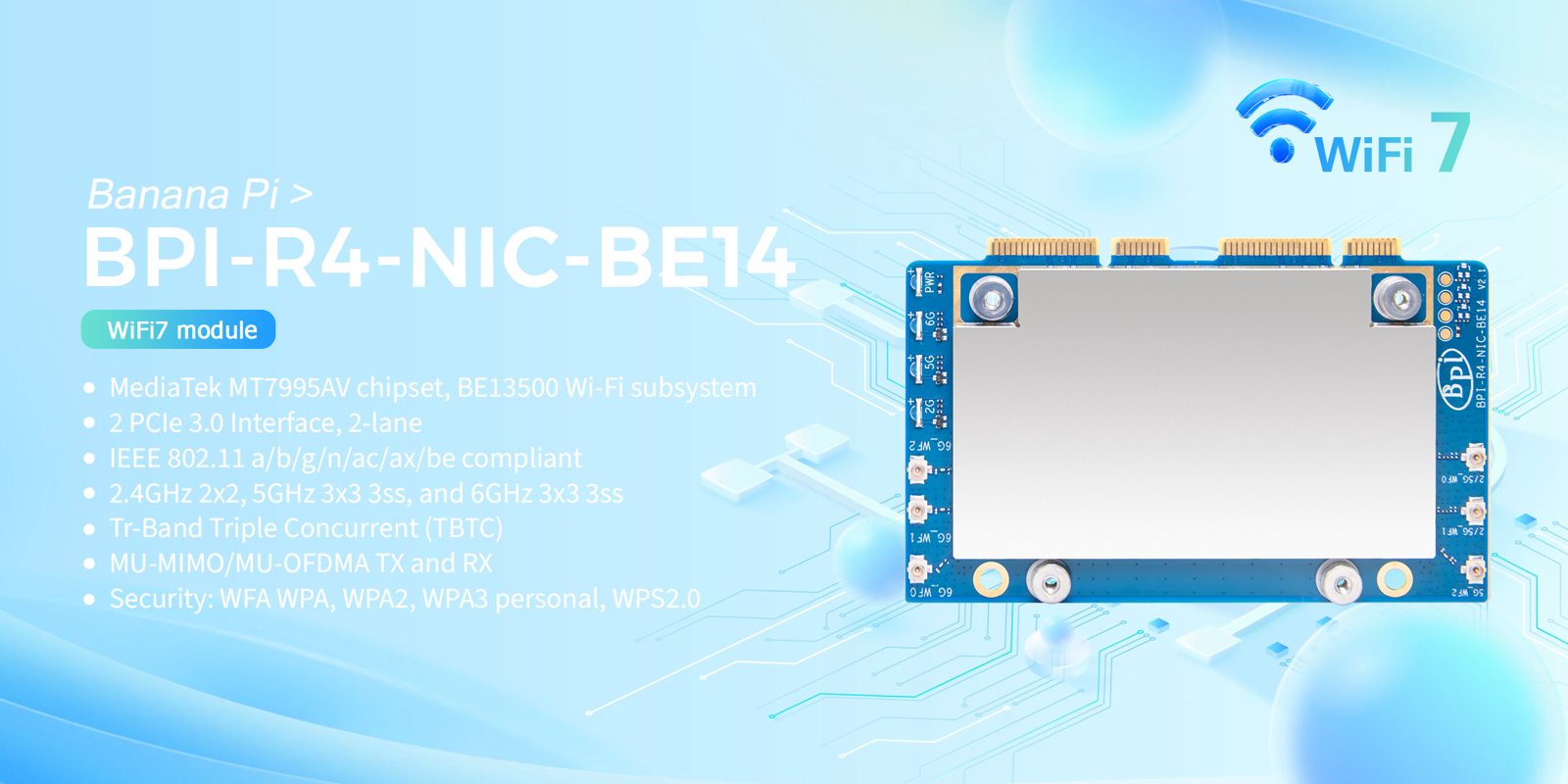
The Wi-Fi comes from a separate card, the BPI-R4-NIC-BE14, built on MediaTek's MT7995AV. It's a tri-band, tri-concurrent BE13500-class design:
| Band | Streams | Channel widths |
|---|---|---|
| 2.4 GHz | 2x2 | 20 / 40 MHz |
| 5 GHz | 3x3 | up to 160 MHz |
| 6 GHz | 3x3 | up to 320 MHz |
It supports MU-MIMO, OFDMA and WPA3, and sits in both miniPCIe slots (PCIe 3.0, two lanes). Banana Pi warns the chip runs very hot and recommends a large heatsink, which is why the kit includes a heatsink plus fan for it.
To get real Wi-Fi 7 speeds you need Wi-Fi 7 devices, such as recent flagship phones and laptops with Intel BE200 or Qualcomm FastConnect 7800 cards. Older devices still connect at Wi-Fi 6/6E/5 speeds.
eMMC, NAND, microSD and NVMe: what each one is for
The board can boot from three places, chosen with a two-position boot switch (SW3), and has NVMe for data:
| Storage | Size | Boot switch (A/B) | Best use |
|---|---|---|---|
| microSD | your card | 1 / 1 | First boot, testing, and a spare "rescue" card |
| SPI-NAND | 256 MB | 0 / 1 | Bootloader plus a recovery copy of OpenWrt |
| eMMC | 8 GB | 1 / 0 | Your everyday OpenWrt install |
| NVMe (2x M.2, PCIe 3.0 x1) | your SSD | not bootable | Logs, AdGuard Home, containers, a small file share |
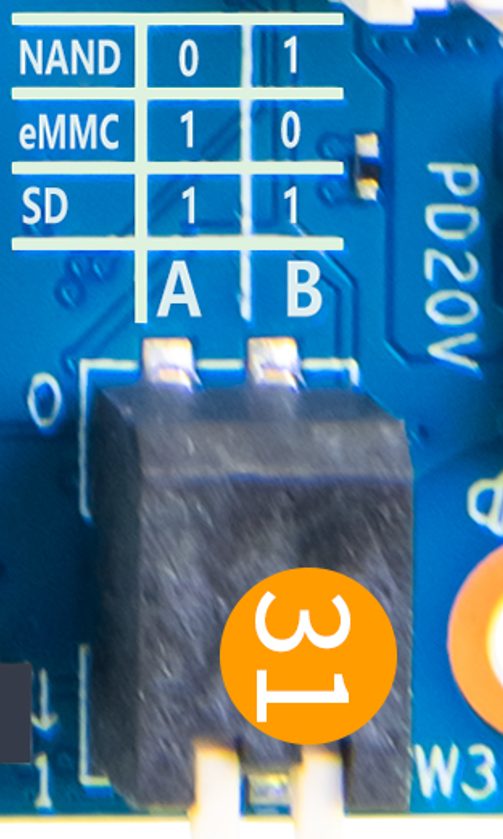
A sensible setup: boot from microSD first, install the bootloader and a recovery system to NAND, put your real OpenWrt on eMMC, and keep NAND as the safety net. If an update ever goes wrong, flip the switch to NAND and you're back in. NVMe is optional. Interfacing Linux measured about 800 MB/s on its single PCIe lane, which is plenty for logs and containers.
Firmware: OpenWrt, and why not pfSense or OPNsense?
This is the most important section if you're thinking of buying one.
New to OpenWrt? Start with What is OpenWrt?, which explains LuCI, firewall zones and packages with real screenshots.
- Official OpenWrt (openwrt.org). As of 26 November 2026, the OpenWrt project's snapshot (development) builds include images for both the BPI-R4 Pro 4E and 8X: SD card, NAND and eMMC images, plus upgrade files. The Pro is not yet in a stable release (OpenWrt 25.12.6 lists the BPI-R4, R4 Lite and R4 PoE, but not the Pro). Snapshots move daily and don't include the LuCI web interface by default; you add it with
apk add luci. This is the route to watch: once a stable release supports the Pro, it becomes a straightforward recommendation. - Banana Pi's OpenWrt 24.10 image. Banana Pi publishes its own builds (for the 4E:
BPI-R4Pro-4E-BE14-MT76-OpenWRT24.10-260325) with the Wi-Fi 7 driver included, downloadable from Google Drive and Baidu. Fine for checking your hardware works. The OpenWrt community's standing advice is to run builds from openwrt.org on a network you care about, and I agree for a main router. - BpiRouterOS. Banana Pi's own router OS, documented on its site.
- Debian. Community images (Frank Wunderlich's BPI-Router images) turn it into a small Linux server with lots of Ethernet ports.
- pfSense and OPNsense: no. Both are built on FreeBSD for x86 PCs. There's no build for this Arm chip, and pfSense's Arm versions only run on Netgate's own appliances. If you want pfSense or OPNsense, use an x86 appliance like the Protectli V1610, and use the BPI-R4 Pro as a Wi-Fi 7 access point next to it. For the BPI, OpenWrt is the right answer. (See also pfSense vs OPNsense.)
What can you use the BPI-R4 Pro for?
1. Replace your ISP router
Plug your fibre or NBN connection box into the 2.5G WAN port, set the WAN to DHCP or PPPoE (whatever your ISP uses), and the BPI-R4 Pro becomes your main router and firewall. You get your own firewall rules, no cloud account and no ISP firmware. If your ISP hands over fibre on an SFP module (some XGS-PON setups do), the 4E's 10G SFP+ WAN can take it after a one-line U-Boot change.
2. A Wi-Fi 7 access point with separate networks (VLANs)
If you already run pfSense or OPNsense, keep it as the firewall and run the BPI as a "dumb" access point: no routing, one cable to the firewall carrying several VLANs, each with its own Wi-Fi name. Family, kids, smart devices and guests get separate networks, so a cheap smart camera can't reach your laptop. This is how I plan to use mine first.
3. Kids' and smart-device controls
OpenWrt firewall rules can be time-based (weekdays, start and stop times), so "no internet on the kids' network from 23:00 to 06:00" is a single rule. Pair it with DNS filtering (Pi-hole or AdGuard Home) for content filtering.
4. A home lab or small office router
With 10G SFP+, four 2.5G ports and VLAN support, it can route a lab: servers, a DMZ for public services, and a 10G trunk to a managed switch.
5. 5G backup internet
The three M.2 B-key slots take cellular modules. Banana Pi lists the Quectel RM500U-CNV, RM520N-GL and EM05-E as tested, and its latest 8X image added cellular support. That makes automatic 5G failover possible when your fixed line drops.
6. VPN gateway and ad-blocking
WireGuard and AdGuard Home are standard OpenWrt packages, and the NVMe slots give AdGuard Home and logs somewhere to live.
How to install OpenWrt on the BPI-R4 Pro
A short version of the process, from Banana Pi's getting-started guide and the OpenWrt images (the full step-by-step video is coming with our hands-on review):
- Download the image for your exact model (4E or 8X) from the OpenWrt firmware selector (search "BPi-R4 Pro") or from Banana Pi's docs.
- Prepare the microSD card. Wipe it completely first (Banana Pi warns that leftover data causes "jffs2" errors), then write the image with balenaEtcher, or on Linux:
gunzip -c <image>.img.gz | sudo dd of=/dev/sdX bs=4M status=progress conv=fsync. - Set the boot switch to SD (A=1, B=1), connect the USB-C debug port to a computer (115200 baud) and power on. Watch it boot.
- Open LuCI at
http://192.168.1.1, set a root password and the correct timezone. - Install to NAND, then eMMC. Banana Pi's method for its own images: copy the image to a FAT32 USB stick, then write NAND (on the Pro, the whole NAND is
mtd3) withmtd erase /dev/mtd3andmtd write <image>.bin /dev/mtd3. For eMMC, boot from NAND (SD and eMMC share a controller), then write the bootloader to/dev/mmcblk0boot0and the image to/dev/mmcblk0. Flip the switch to eMMC (A=1, B=0) and reboot. The official OpenWrt images ship separate preloader, bootloader and GPT files for NAND and eMMC; follow the OpenWrt wiki page for the board for that route.
4E only, switching the combo WAN port (in U-Boot, press Esc at the boot menu):
setenv bootconf_extra mt7988a-bananapi-bpi-r4-pro-4e-sfp    # use the 10G SFP+ WAN
setenv bootconf_extra mt7988a-bananapi-bpi-r4-pro-4e-iphy   # use the 2.5G RJ45 WAN (default)
saveenv
reset
Known limitations
Being honest about these is the point of a review:
- Official OpenWrt is still in snapshots for the Pro. Stable support is the thing to wait for if you want set-and-forget.
- Wi-Fi driver maturity. On the original BPI-R4, Van Tech Corner found the BE14 needed a device-tree workaround for transmit power on official OpenWrt 25.12, and Banana Pi's own image only configures Wi-Fi 7 MLO over SSH, not in the web interface.
- 10G performance depends on the firmware. Interfacing Linux saw a full 10 Gb/s in one direction but only about 5 Gb/s back in a two-way test on the 8X with Banana Pi's image. On the original R4, official OpenWrt routed far slower than MediaTek's own SDK firmware until offloading was tuned.
- Not plug-and-play. Expect a serial console, a boot switch and OpenWrt menus. There's no phone app.
- 4E combo WAN has to be switched in U-Boot, not by just plugging in.
- Front barrel jack and price. The DC jack sits on the front of the case (USB-C PD is the alternative). The complete kit costs more than many consumer Wi-Fi 7 routers, because you're paying for 10G, expansion and open hardware.
Who should buy it, and who shouldn't
Buy it if you:
- want a router and firewall you fully control with open-source firmware
- run a home lab, or want to replace your ISP router with something serious
- need 10G or 2.5G ports, VLANs, or 5G backup in one box
- are comfortable with OpenWrt, or want to learn it
Skip it if you:
- want app-based mesh Wi-Fi working in ten minutes
- need pfSense or OPNsense on the same box (get an x86 appliance)
- aren't willing to work with development firmware until stable support lands
Alternatives
- Banana Pi BPI-R4 (original): same chip, gigabit instead of 2.5G ports, cheaper, and already in stable OpenWrt releases.
- Banana Pi BPI-R4 Lite / R4 Mini: MediaTek Filogic 860 boards for smaller, cheaper builds.
- An x86 appliance with pfSense or OPNsense (such as the Protectli V1610) plus a separate Wi-Fi 7 access point: more firewall features, but two boxes.
Price and where to buy
The BPI-R4 Pro 4E complete kit (board, Wi-Fi 7 card, case, fans, antennas, power supply) is USD 384 on Banana Pi's official shop (checked 26 November 2026), with EU or US plug options. The bare board (PCBA) and the 8X are also listed there.
Buy the Banana Pi BPI-R4 Pro kit from the official Banana Pi shop
It's also sold through Banana Pi's AliExpress stores and some resellers. At the time of writing we couldn't find it on Amazon.
Learn more: my firewall and home lab courses
If you want to go deeper on the firewalls and the home lab platform mentioned here, these are my own step-by-step courses on Udemy:
- pfSense: Network Security and Firewall Management: install pfSense and build rules, VLANs, VPNs and filtering from scratch.
- OPNsense Firewall: Complete Guide to Network Security: the open source pfSense alternative, from install to intrusion prevention.
- Network Security with Arista (Untangle) NG Firewall: Arista's Edge Threat Management (formerly Untangle) next-generation firewall.
- Proxmox VE 9 Mastery: Virtualization, Clustering, Ceph & AI: the platform my home lab runs on.
- Proxmox VE: Build a High Availability Cluster with Ceph (Lab): a hands-on HA cluster with Ceph storage.
FAQ
Is the Banana Pi BPI-R4 Pro supported by OpenWrt? Yes, in OpenWrt's snapshot (development) builds for both the 4E and 8X, as of November 2026. It isn't in a stable release yet. Banana Pi also publishes its own OpenWrt 24.10-based images with the Wi-Fi 7 driver.
Can I install pfSense or OPNsense on the BPI-R4 Pro? No. Both need an x86 PC, and the BPI-R4 Pro uses an Arm chip. Use OpenWrt on the BPI, or pair an x86 pfSense box with the BPI as a Wi-Fi 7 access point.
What's the difference between the BPI-R4 Pro 4E and 8X? The 8X has 8 GB of RAM and 10G copper (RJ45) ports next to its SFP+ cages, which switch automatically. The 4E has 4 GB, a 2.5G RJ45 WAN shared with the 10G SFP+ WAN (switched in U-Boot), a 10G SFP+ LAN, and the same four 2.5G ports.
Does the BPI-R4 Pro kit include Wi-Fi? The complete assembly kit includes the BPI-R4-NIC-BE14 Wi-Fi 7 card with its own fan, plus antennas. The bare board doesn't.
Should I install OpenWrt on eMMC, NAND or the SD card? Use the SD card to start, NAND for a recovery system, and eMMC for daily use. NVMe can't boot the board, but it's good for logs and containers.
Can the BPI-R4 Pro replace my NBN or fibre router? Yes, if your connection hands over Ethernet (as NBN connection boxes do): plug it into the 2.5G WAN and set DHCP or PPPoE as your ISP requires. Keep your ISP's details if you use their phone service.
What's next
Our BPI-R4 Pro 4E kit is on its way. The full video will cover unboxing and assembly, installing OpenWrt on SD, NAND and eMMC, setting it up as a main router, and how I use it as a Wi-Fi 7 access point with separate VLANs next to pfSense in my home lab, with speed, Wi-Fi 7, power and temperature tests. This article will be updated with the results.
Sources: Banana Pi BPI-R4 Pro documentation (product page, getting started, FAQ, BPI-R4-NIC-BE14 page); Banana Pi official shop; OpenWrt downloads (snapshot and 25.12.6 target lists for mediatek/filogic); MediaTek Filogic 880 product page; independent reviews by Interfacing Linux (BPI-R4 Pro) and Van Tech Corner (BPI-R4). Product images courtesy of Banana Pi, CC BY-SA.
Related videos
Video library- Networking and Security
OPNsense Interface Configuration: Pro Tips & Tricks
· 6:13 · 2K views
Watch on YouTube
Keep reading
 Networking and SecurityWhat Is OpenWrt? The Open Source Router OS Explained, With Real Screenshots (2026)What OpenWrt is, why it matters, how it works (LuCI, UCI, firewall zones, apk), what it runs on, and how I use it in my home lab, with real screenshots. · 8 min read
 Networking and SecurityBest Next-Generation Firewalls (NGFW) in 2026: Vendors Compared for SMB and EnterpriseBest next-generation firewalls in 2026: Palo Alto, Fortinet, Check Point, Cisco, Juniper, Sophos and SonicWall compared, with test results and how to choose. · 11 min read
 Networking and SecuritypfSense vs OPNsense (2026): Which Open Source Firewall to ChoosepfSense vs OPNsense in 2026: OPNsense ships fully open, frequent releases; pfSense CE stays free and Plus fits Netgate hardware. Here is which to choose. · 11 min read