Networking and Security
IT Admin’s Handbook for troubleshooting common network problems
By Amjid Ali · · Updated · 7 min read
Businesses today often adopt new technologies to improve their business operations and meet their business goals. However, incorporating these new technologies results in complex business infrastructures.
One of the common downsides of owning a complex network infrastructure is that it leads to multiple network issues, which if not addressed in time will lead to a disastrous downtime. To avoid this, IT Admins must conduct checkups and carry out troubleshooting regularly.
A Gartner survey found that the average cost of IT downtime is $5,600 per minute, which amounts to over $300,000 per hour. This is a generalized figure, and costs can be higher or lower depending on the industry and scale of operation.
Let’s learn more about network troubleshooting and the basics of troubleshooting. Additionally, we will also see the common network issues faced by IT admins and how we can best tackle them.
What is network troubleshooting?
Network troubleshooting is the process of identifying and resolving the network issues within the network. Ideally, IT admins measure the network performance, analyze data, drill down to the root cause of the issue, and fix it. Troubleshooting not only allows you to resolve the problems but also helps you understand the origin of the problem and other issues that need to be addressed for enhanced network performance.
Any problems related to network connectivity, security, network performance, and all the other network aspects will be rectified periodically which ensures reduced MTTR, consistent network uptime, and seamless network operations. This helps prevent future disruptions and maintain a reliable network.
Importance of network troubleshooting:
Any minor network issue can quickly escalate and cause serious damage to the network, resulting in a downtime. This is why regular checkups to fix potential issues are necessary.
Prompt identification of network issues can help businesses fix these issues at once, ensuring optimal network performance.
Here are some of the reasons why network troubleshooting is important:
- Cuts down the chances of downtime
- Ensures enhanced network performance
- Prevents security incidents
- Reduces operational costs
- Boosts network growth and scalability
Now that we’ve seen why network troubleshooting is important, we’ll next see what IT admins are dealing with behind the screens: the challenges and common network problems faced by them.
Common types of network problems IT admins face:

If you take a business network, there are multiple causes for something to go wrong, and determining the nature of the issue is the first step towards solving it. This also involves examining network traffic, round-the-clock monitoring of the connectivity, pin-pointing performance problems, and a fair idea about the network elements.
Furthermore, IT admins need an understanding of hardware configurations, network protocols, and other performance metrics to ensure seamless business operations and user experience.
Following are some of the common types of network problems IT admins face:
- Hardware issues
- Software issues
- Bandwidth issues
- Configuration issues
- Firewall and IP management issues
Let’s further explore the various network problems associated with hardware, software, bandwidth, configuration, and security.
Hardware issues:
One of the foremost reasons a hardware issue occurs is usually due to device misconfigurations and hardware load. Some of the common hardware issues include an unexpected spike in temperature, inadequate ventilation, variations in voltage/power supply, irregular processor speed, weak batteries, etc. These hardware issues can negatively impact network functionality, resulting in unexpected downtime or network failures, highlighting the importance of an hardware monitoring tool.
Poor physical connectivity due to connectors or defective cables is another reason why network issues can occur. Cases like a faulty network cable, loosened cable, or even unintentional disconnection of the cable often lead to network issues.
When such fault happens, the need to check every single cable or the hardware devices becomes inevitable, which is daunting, and sometimes before you identify and locate the issue, it might escalate and kill the network performance. That’s why a network performance monitoring tool that monitors every network interface is essential.
Software issues:
Software issues such as OS troubles, slow service response times, process and service unavailability could negatively impact business critical applications and cause end-user interruption. This creates a need for proactive monitoring and a network troubleshooting solution where the server availability, health, and uptime of the applications are keenly monitored in order to avoid any software issues.
Bandwidth issues:
An network’s capacity to transfer data between devices or the internet within a specific timeframe is called bandwidth. Enhanced bandwidth enables quicker data transfer across the network that connects all devices simultaneously.
However, network congestion tends to appear when a large application is running, resulting in insufficient bandwidth for the other network devices. This can impact the download speed over the internet.
Factors like unstable WAN links, poor VoIP calls due to jitter, packet loss, latency, etc., leads to excessive bandwidth usage.
One of the silent killers of a network is a DNS issue, which is often overlooked by IT admins. Let’s consider an e-commerce site facing trouble connecting to the IP address due to a DNS issue. A few hours of downtime can wreck havoc on the business and result in poor end user experience. This is where a network troubleshooting tool will be helpful for easier identification of DNS issues and resolving.
Configuration issues:
IT admins must ensure that their devices are properly configured, particularly when configuring or reconfiguring devices, connecting to VLAN or VPN networks, or upgrading hardware on the network, to ensure smooth network operations. Numerous network issues that arise from device misconfigurations can impact various areas of the network significantly.
To ensure this doesn’t happen, businesses need to employ a network monitoring and troubleshooting solution that checks for misconfigurations and manages them proactively, averting such configuration issues.
Firewall and IP management issues:
Each firewall in a network infrastructure has unique configurations and policies. The main task is making sure all the policies are organized, up-to-date, and without being overlapped. Missing or skipping to do so will result in network vulnerability exposing the network to threats. IT admins can employ a monitoring tool for support to tackle such circumstances.
In addition to that, two devices can never share an IP address in a network. But if that happens, the said devices won’t be able to connect to the network. Monitoring and managing such rogue IPs ensures optimal network function.
How to troubleshoot network issues: A step-by-step guide
IT admins have to be well-equipped to deal with network complications and reduce mean time to resolve (MTTR). Understanding network issues can come handy while fixing a network problem. Here’s a step-by-step guide for swift troubleshooting to maintain a high availability network at all times.
Step 1: Pinpoint the network issue
Step 2: Monitor and track the cause of the issue
Step 3: Troubleshoot the problem
Step 4: Document the problem, the steps taken to address it, and solutions.
These steps allow IT admins to understand the network issues and also allow other stakeholders to learn from them, saving a lot of time to resolve them in the future when an issue occurs.
Troubleshoot network issues with ManageEngine OpManager Plus
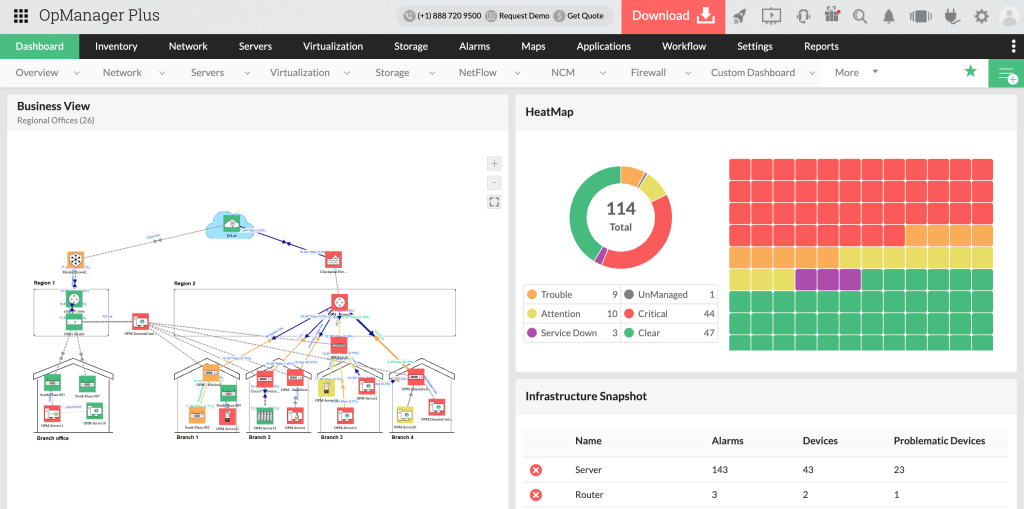
Issues in a network can occur at any time in a network due to various factors. A network troubleshooting tool designed to take on an enterprise network is paramount. One such tool is ManageEngine OpManager Plus. Incorporating an efficient troubleshooting tool in your network infrastructure can ensure quicker identification and troubleshooting of various network issues across various devices.
Here are some of the features that OpManager Plus offers that ensures seamless troubleshooting:
Root cause analysis: To analyze the root cause of the problem and promptly address them.

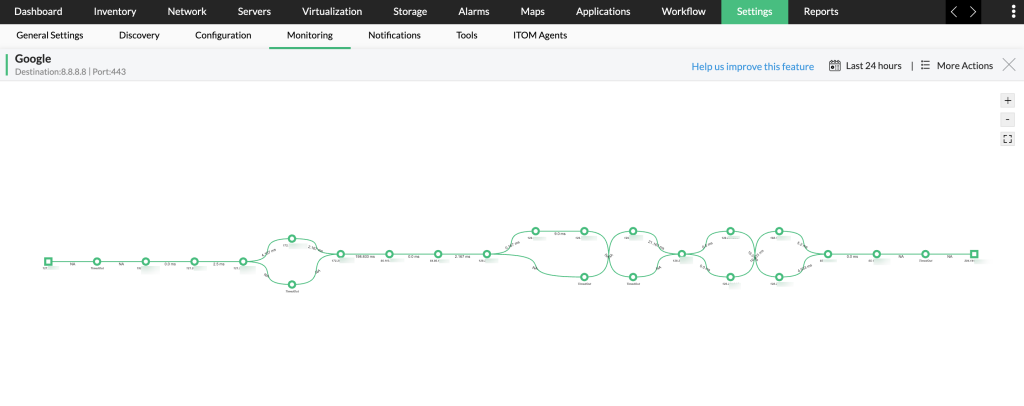
Network path analysis: For consistent visualization and monitoring of the network paths.
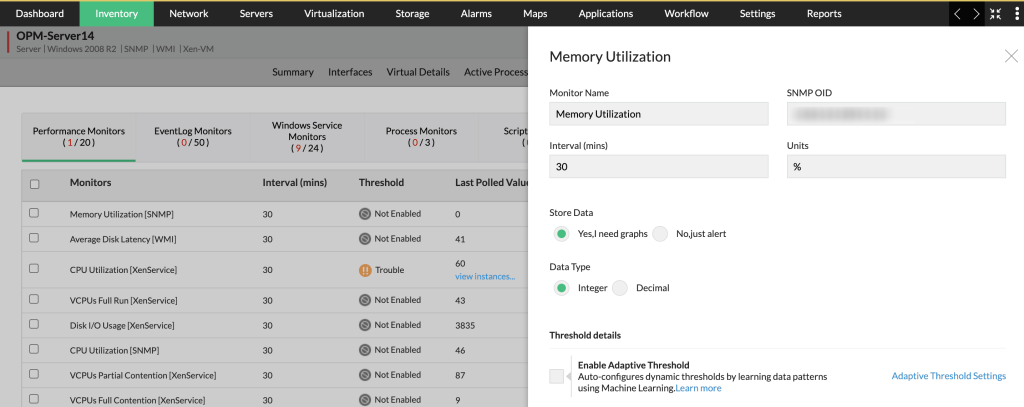
Adaptive thresholds: To simplify and automate threshold configuration using ML.
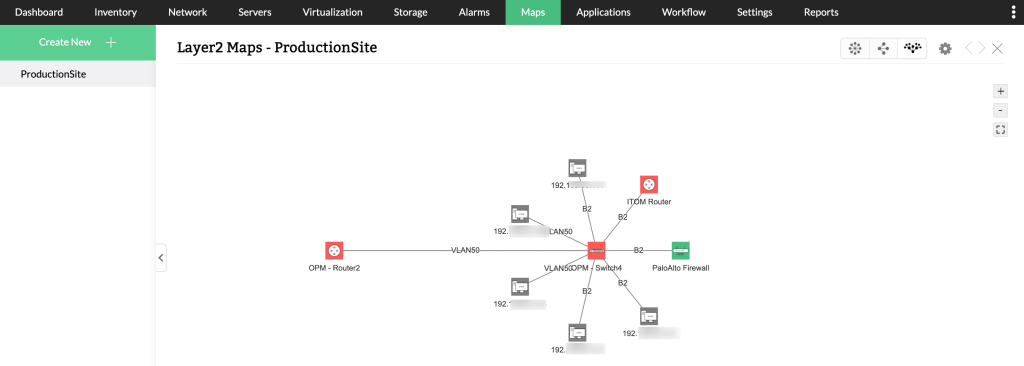
Network topology maps: To visualize the interconnections between devices and elements in your network infrastructure.
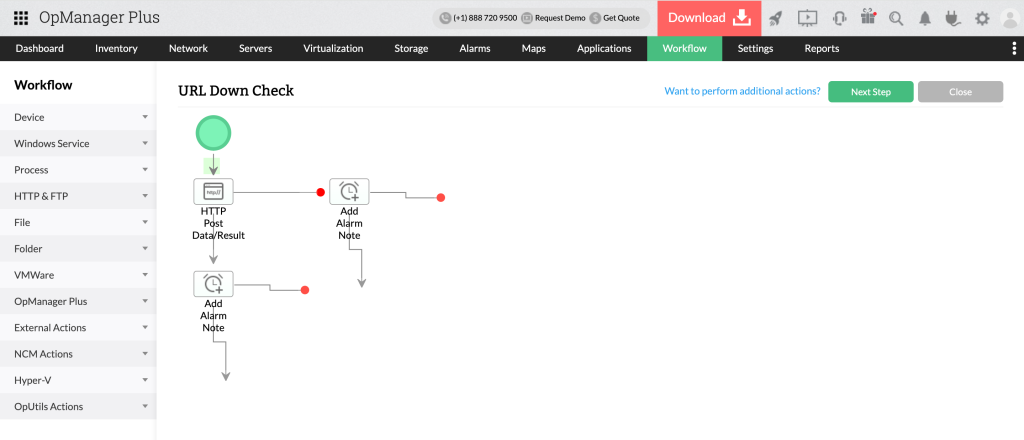
Workflow automation: To simplify the repetitive and daunting maintenance efforts via predetermined routine tasks to execute either during network malfunctions or as ongoing maintenance duties.
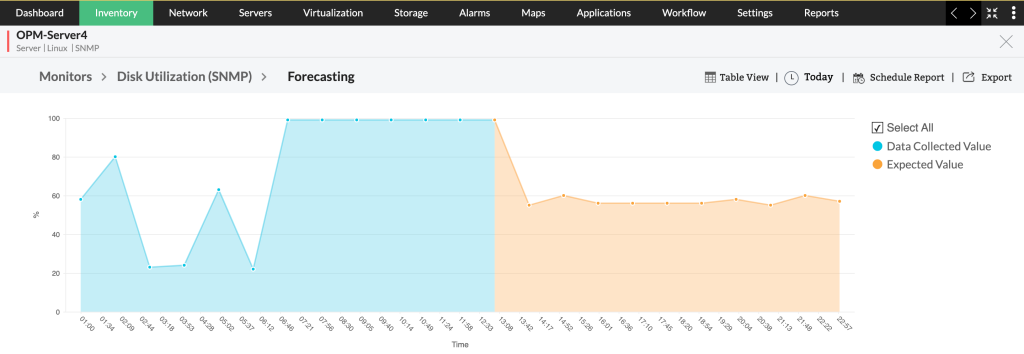
Forecasting performance trends – Utilize advanced predictive algorithms and modern technologies such as AI and ML to anticipate the future trends of a device or an interface. Using the forecasting performance trends feature, network admins can accurately predict these upcoming performance trends and make proactive adjustments to keep up with the network’s evolving needs.
Apart from this, a complex network can face multiple other network issues like packet loss and jitter, which can lead to costly wrecks if left unattended. To combat these issues, OpManager Plus enables IT admins to perform packet loss monitoring, latency monitoring, and monitor jitters caused due to network congestion, outdated hardware, etc.
OpManager Plus also facilitates an efficient approach for troubleshooting via network tool sets, such as ping, traceroute, SNMP Ping, DNS resolver, DHCP Scope monitor, WMI Query tool, CLI Query tool, SNMP tool, and cisco tools.
Starting from the server issue of business critical applications to a mere network jitter, OpManager Plus can help.
If you’re interested in learning more about OpManager Plus and what it can do, sign up for a free, personalized demo of the product. OpManager Plus also provides a 30-day trial period, during which you can test out the solution before making any decision.
Keep reading
 Networking and SecuritypfSense vs OPNsense (2026): Which Open Source Firewall to ChoosepfSense vs OPNsense in 2026: OPNsense ships fully open, frequent releases; pfSense CE stays free and Plus fits Netgate hardware. Here is which to choose. · 11 min read
 Networking and SecurityHow Much Should a Business Spend on IT?Knowing how to allocate business funds is a huge part of determining whether the company will succeed or not. While budgets look different from business to · 2 min read
 Networking and SecuritySecuring AI-Driven Systems with Zero-Trust Architecture: A Practical GuideProtect AI-driven systems with zero-trust architecture. Learn practical strategies for securing machine learning infrastructure. · 5 min read