AI and Automation
How to Automate Laser Cutting File Generation with AI and Workflow Tools
By Amjid Ali · · Updated · 6 min read
In this article
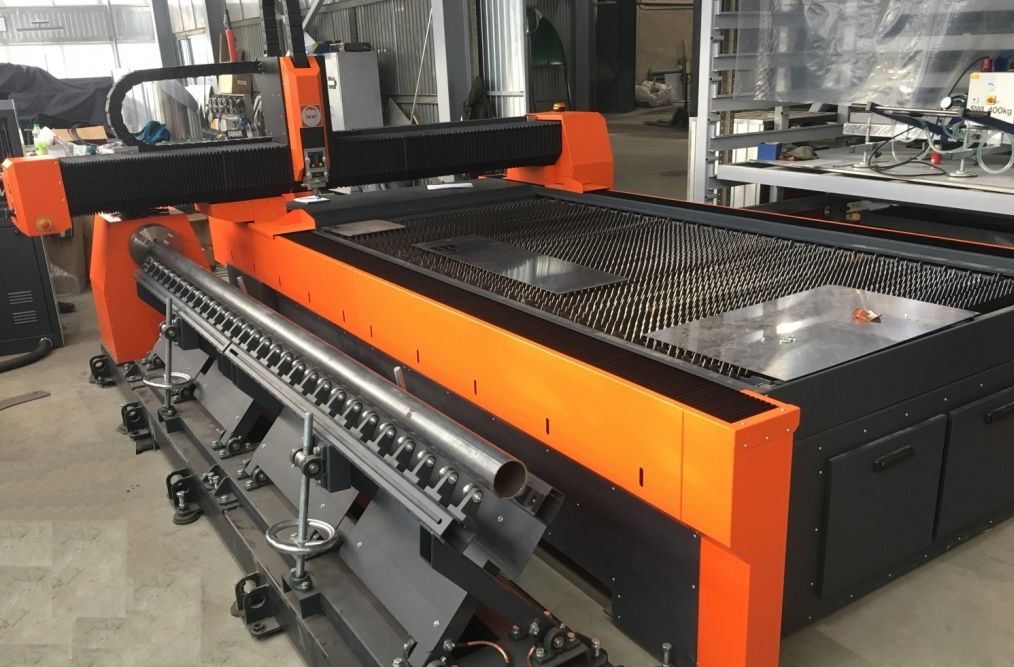
Laser cutting has transformed manufacturing, enabling precise and intricate designs in industries such as aerospace, automotive, and crafts. However, preparing files for laser cutting-typically in formats such as SVG or G-code-can be time-consuming, error-prone, and resource-intensive. Manual processes such as designing in CAD software, converting files, and integrating them into production workflows often create inefficiencies and bottlenecks.
By combining artificial intelligence (AI) with low-code automation tools such as n8n, companies and individuals can streamline the entire process from design creation to file delivery. This article explores how to automate laser cutting file generation using AI and workflow tools, providing a scalable solution that aligns with the principles of DevOps, low-code automation, and digital transformation. We’ll cover the technical setup, practical applications, and real-world benefits, making this guide relevant to industrial engineers, hobbyists, and IT professionals.
Why automate laser cutting file creation?
Creating laser cutting files involves multiple steps: designing the pattern, converting it to a machine-readable format, validating the design, and integrating it into production systems. Each step introduces potential errors, delays, and dependencies on skilled personnel. Automating this process addresses several challenges:
- Speed: Automation reduces design-to-production time, enabling faster iteration and delivery.
- Accuracy: AI-driven design and validation minimize human error in file creation.
- Scalability: Automated workflows handle large volumes of designs without a proportional increase in effort.
- Integration: Connecting design creation to enterprise systems streamlines operations.
- Cost efficiency: Reducing manual work and errors lowers operating costs.
This approach is particularly relevant for industries undergoing digital transformation, where tools like n8n and AI platforms (e.g., OpenAI’s GPT-4 or DALL-E) enable seamless integration of creative and operational processes. For example, a printer optimizing its workflow for laser-cut signage could use this approach to reduce turnaround time and improve quality.
Step 1: AI-driven design creation
The first step in automating laser cutting file creation is to create the design itself. Traditionally, this requires CAD software such as AutoCAD or Adobe Illustrator, where designers manually create vector-based files. AI can simplify this by generating designs based on textual or visual input.
Using AI for design creation
AI models, such as OpenAI’s GPT-4 for text-to-vector processing or DALL-E for image generation, can generate design concepts. For laser cutting, the goal is to generate vector-based designs in machine-ready SVG format. Here’s how it works:
-
Text-to-Design Prompting:
-
A textual description (e.g., “Create a geometric floral pattern for a 10x10cm laser-cut wooden plaque”) is entered into an AI model.
-
The AI can output a description of the design or generate vector data that can be converted to a usable SVG file.
-
Alternatively, if a raster image is generated, it can be vectorized using external tools.
-
-
Vectorization:
-
If the AI produces a raster image, automated tools can trace it into vector paths, creating an SVG file.
-
The SVG must be optimized for laser cutting, ensuring continuous paths and no overlapping lines.
-
-
Validation:
- AI can validate the design for laser cutting compatibility, checking for issues such as closed paths or minimum line thickness.
Example Workflow
A user submits a challenge such as “Design a laser-cut keychain with a star pattern. The AI generates a design, either as vector data or as a raster image that is then vectorized. The result is a clean SVG file ready for further processing. This approach reduces the need for manual design expertise, making it accessible to non-designers while maintaining precision.
Step 2: Building an Automated Workflow with n8n
Once the design is created, the next step is to automate its processing, conversion, and delivery. n8n, an open source, low-code automation platform, is ideal for orchestrating this workflow. It integrates with APIs, file systems, and production tools to create a seamless pipeline.
Setting up the workflow
An automated workflow for generating laser cutting files typically includes the following components
-
Trigger:
- The process begins with an input, such as a user-submitted form or webhook, that captures design parameters such as dimensions, material type, or style preferences.
-
AI integration:
-
The workflow connects to an AI model’s API to generate the design based on user input.
-
For example, a text prompt is sent to the AI, which returns vector data or a raster image.
-
-
File processing:
-
When a raster image is created, it is converted to SVG using automated tools.
-
The SVG is optimized for laser cutting, removing redundant paths and ensuring compatibility.
-
The file can then be converted to G-code, a format used by many laser cutting machines, using specialized software or libraries.
-
-
Validation:
- Workflow checks the file for errors, such as open paths or incompatible geometries, to ensure it meets laser cutting requirements.
-
Delivery:
- The final file is sent to the desired destination, such as an FTP server for the laser cutter, an email to the production team, or a cloud storage service such as Google Drive.
Example Workflow
The workflow starts when a user submits a design request. The system processes the request, generates a design using AI, converts it to an optimized SVG, validates it, and uploads it to a server for production. This entire process occurs without manual intervention, saving time and reducing errors.
Step 3: Integration with ERP/BPM Systems
To fully realize the benefits of automation, the workflow should be integrated with enterprise systems such as ERP (e.g. Odoo, SAP) or BPM (e.g. Camunda). This ensures that laser cutting file generation is part of a broader production pipeline.
Integration Steps
-
Order Creation:
- When a design is created, a production order is automatically created in the ERP system, including metadata such as dimensions or material requirements.
-
Routing and Notifications:
-
The workflow updates the BPM system with the production route (e.g., “Design Ready → Cut → Quality Check”).
-
Notifications are sent to the production team via email or a messaging platform when the file is ready.
-
-
Inventory Management:
- Before generating the file, the workflow checks material availability in the ERP system to ensure sufficient stock.
-
Tracking and reporting:
-
Design creation and file delivery are logged in the ERP for traceability.
-
Reports can be generated to analyze production efficiency, error rates, or turnaround times..
-
Integration Example
A customer order in the ERP system triggers the workflow. The system retrieves the order details, generates the laser cutting file, and updates the order status. The file is sent to the laser cutter and the production team is notified-all within minutes. This aligns with DevOps principles by creating a continuous pipeline from design to production.
Benefits and Use Cases
There are significant benefits to automating the creation of laser cutting files:
- Efficiency: Workflows that used to take hours can be completed in minutes. For example, a small business producing custom laser-cut jewelry can create designs on demand without the need for additional designers.
- Error reduction: AI validation and automated processing eliminate common errors such as incorrect path definitions or incompatible file formats.
- Scalability: Manufacturers can handle high volumes of custom orders, as seen in industries such as signage or furniture manufacturing.
- Cost savings: Automation reduces labor costs and minimizes material waste due to errors.
- Accessibility: Non-experts can create professional designs using AI, democratizing access to laser cutting technology.
Real-world example: Print Shop Optimization
A print shop specializing in custom signage took this approach to streamline its laser cutting operations. By integrating automation tools with AI and their ERP system, they reduced design-to-production time by 70%, reduced errors by 50%, and increased customer satisfaction. This is in line with digital transformation, where automation and AI drive operational excellence.
Challenges and Considerations
While this approach is powerful, there are challenges:
- AI limitations: Generating complex designs may require fine-tuning of AI models or post-processing to meet accuracy requirements.
- Tool Compatibility: Ensure that the laser cutting machine supports the generated file formats.
- Security: Secure API keys and file transfers to prevent unauthorized access.
- Learning curve: Setting up automation workflows and integrating with ERP systems requires an initial investment in time and skills.
To address this, start with simple workflows and scale complexity as expertise grows. Use open source tools and community resources to minimize costs.
Conclusion.
Automating laser cutting file generation with AI and workflow tools like n8n represents a powerful convergence of low-code automation, AI, and digital transformation. By leveraging AI for design generation, automation platforms for workflow orchestration, and ERP/BPM systems for integration, companies can achieve unprecedented efficiency, accuracy, and scalability. Whether you’re a manufacturer optimizing production or a hobbyist creating custom designs, this approach offers a practical, future-proof solution.
Related videos
Video library- AI and Automation
Automate Your YouTube Metadata with N8N and AI Agent
· 5:32 · 1.7K views
Watch on YouTube - AI and Automation
Automate YouTube Videos with AI, n8n & HeyGen – No Manual Work!
· 9:18 · 1.1K views
Watch on YouTube - AI and Automation
Claude.md: One Simple File to Unlock More from Claude Code
· 3:41 · 448 views
Watch on YouTube
Keep reading
 AI and AutomationHow to Build an AI Model: A Complete Guide for DevelopersAI model development in 8 steps: define the problem, prepare your data, choose tools, engineer features, train, validate, deploy and keep improving the model. · 6 min read
 AI and AutomationThe Ultimate Guide: 20 Best Low-Code Platforms for Homelab and IT Automation ProjectsThe best low-code platforms for homelab projects and IT automation. Compare n8n, Node-RED, Appsmith, and 17 more tools — with pros, cons, and use cases. · 2 min read
 AI and AutomationHow to Automate Your IT Infrastructure: A Beginner’s Guide to AI Agents and Homelab AutomationAre you tired of manually managing your homelab and IT infrastructure? Here's a more detailed breakdown of how automation can transform your setup from ... · 2 min read