Cloud and Self-Hosting
Asustor Drivestor 2 Lite (AS1102TL) Review: A Budget 2-Bay NAS, Tested
By Amjid Ali · · Updated · 6 min read
In this article
Prefer to watch? This video walks through it step by step. Prefer to read? The full guide is below.
The Asustor Drivestor 2 Lite (AS1102TL) is a good budget 2-bay NAS for home users: it saturates its single Gigabit port at about 113 MB/s, runs Btrfs with snapshots, and draws only 11.7 W in use. Its limits are the non-upgradable 1 GB of RAM and the lack of 2.5GbE, so it suits file storage, backups and media streaming, not heavy Docker or virtual machine work.
I set it up with two 4 TB hard drives, one Seagate and one WD, in RAID 1, and used it as a backup target for my PCs and phones. Below are the verified specs from Asustor, what it is like to set up, how it compares with the Synology and QNAP rivals, and who should buy it.

Verdict at a glance
| Best for | Home and small office file storage, PC and phone backups, a first NAS |
| Not for | 2.5GbE or 10GbE networks, many Docker containers, virtual machines |
| Speed | About 113 MB/s read and write over SMB (Gigabit limit) |
| Biggest plus | Low price, quiet, Btrfs snapshots on an ARM NAS |
| Biggest minus | 1 GB RAM that cannot be upgraded |
AS1102TL specifications
These are from Asustor's official specification page, checked October 2026.
| Feature | Specification |
|---|---|
| CPU | Realtek RTD1619B, ARM 64-bit quad-core 1.7 GHz |
| RAM | 1 GB DDR4 (not expandable) |
| Flash | 8 GB eMMC for the operating system |
| Drive bays | 2 x 3.5" SATA HDD |
| Max internal capacity | 36 TB raw (2 x 18 TB); up to 120 TB raw with expansion units |
| RAID | Single, JBOD, RAID 0, RAID 1 (Single to RAID 1 migration) |
| File system | Btrfs and EXT4; Btrfs snapshots in Snapshot Center |
| Network | 1 x Gigabit Ethernet, Wake-on-LAN |
| USB | 1 x USB 3.2 Gen 1, 1 x USB 2.0 |
| Encryption | Built-in hardware encryption engine, AES 256-bit |
| Cooling | 1 x 70 mm fan |
| Noise | 18.6 dB (HDD idle) |
| Power use | 11.7 W in operation, 3.1 W with disks hibernating |
| Power supply | 65 W external adapter |
| Dimensions | 165 x 102 x 218 mm (H x W x D) |
| Weight | 1.14 kg |
| Warranty | 3 years |
Earlier versions of this review listed the older RTD1296 chip, 22 TB per drive and different power and size figures. Those came from the previous Drivestor 2; the table above is now matched to Asustor's own page for the Lite.
What's in the box
- AS1102TL NAS unit
- External power adapter
- Ethernet cable
- Quick start guide
Drives are not included, so budget for two matching NAS-rated drives. Drive fitting is tool-free.
Setup: about 15 minutes
- Fit the drives. Tool-free, so no screwdriver needed.
- Connect power and Ethernet to your router or switch.
- Find the NAS. Use Asustor's Control Center app on your PC, or browse to the NAS IP address shown in your router's client list.
- Install ADM (Asustor Data Master). The wizard downloads the latest version and initialises the drives.
- Create the volume. I chose RAID 1 with Btrfs so both drives mirror each other and I can take snapshots.
- Create users and shared folders, then turn on the services you need (SMB for Windows and phones, Time Machine for Macs).
- Add apps from App Central: backup, photo, media and cloud sync apps.
ADM is clean and easy to follow, even for someone who has never used a NAS. Once the shares were up, I connected my Samsung phone using the built-in My Files app: here is how to add network storage on a Samsung phone.
Performance
Asustor's published benchmarks for the AS1102TL show 113 MB/s read and 113 MB/s write for SMB sequential transfers and for a 10 GB Windows file copy. That is the practical ceiling of a Gigabit link, and my RAID 1 copies over SMB sat in the same range.
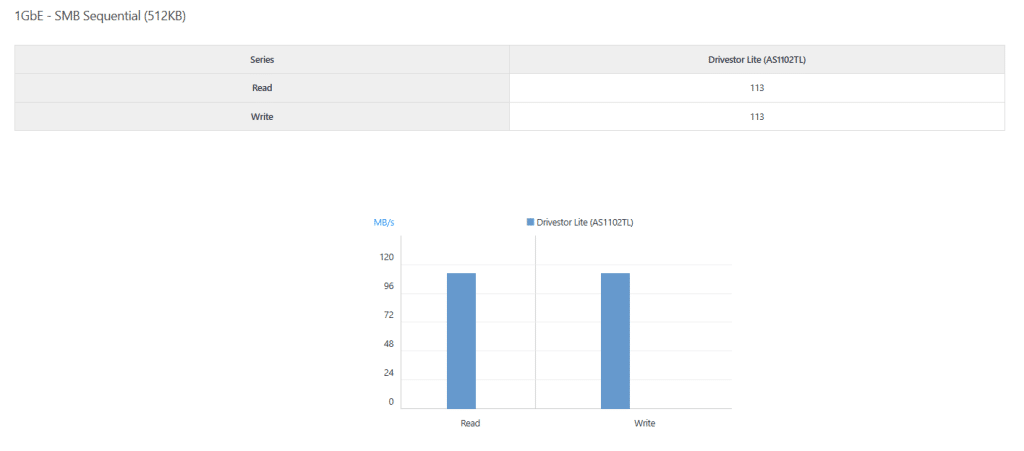
What this means in practice:
- A 10 GB video folder copies in roughly a minute and a half.
- The CPU is not the bottleneck for single large transfers; the network is.
- Many small files (photo libraries) copy slower, as on any NAS.
- More users at once share that same 113 MB/s.
Software and features (ADM)
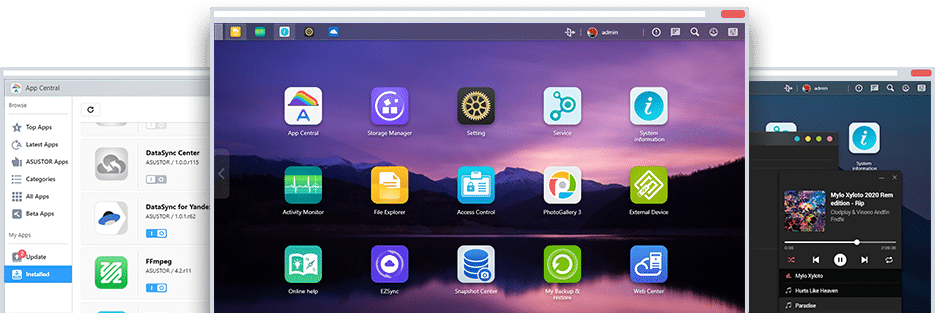
- Btrfs and Snapshot Center: scheduled or manual snapshots, so you can roll back deleted or encrypted files. Asustor says the Drivestor 2 Lite was its first ARM NAS to support Btrfs.
- File sharing and remote access: SMB, AFP, NFS, FTP, WebDAV, plus EZ-Connect for remote access without port forwarding.
- Backup and cloud sync: back up PCs and Macs to the NAS, and sync or back up the NAS to Google Drive, Dropbox, OneDrive and others.
- Media: Asustor advertises 4K transcoding and 10-bit H.265 hardware decoding; Plex Media Server is in App Central.
- Surveillance Center for IP cameras.
- Security: firewall, two-step verification, AES-256 encrypted folders and the ADM Defender tools.
- App Central: Asustor lists over 200 apps.
Who should buy it
Buy the AS1102TL if you:
- want your first NAS for photos, documents and PC backups;
- have a Gigabit network (most home routers);
- want low power use and low noise in a living room or home office;
- need a backup target for a homelab, for example offsite copies from Proxmox Backup Server.
Skip it if you:
- have a 2.5GbE or faster network and want to use it;
- plan to run many Docker containers, databases or VMs (ARM CPU and 1 GB RAM);
- need Plex to transcode several streams at once.
AS1102TL vs Synology DS223j vs QNAP TS-233
| Feature | Asustor AS1102TL | Synology DS223j | QNAP TS-233 |
|---|---|---|---|
| CPU | Realtek RTD1619B, 4 cores, 1.7 GHz | Realtek RTD1619B, 4 cores, 1.7 GHz | ARM Cortex-A55, 4 cores |
| RAM | 1 GB DDR4, fixed | 1 GB DDR4, fixed | 2 GB, fixed |
| LAN | 1 x 1GbE | 1 x 1GbE | 1 x 1GbE |
| Btrfs | Yes | No (EXT4) | No (EXT4) |
| OS | ADM | DSM | QTS |
| Best at | Price, Btrfs snapshots | Polished software and apps | More RAM for apps |
All three hit the same Gigabit ceiling, so the choice comes down to software and price. Synology's DSM has the most polished apps, QNAP gives you more RAM, and the Asustor is often the cheapest of the three and the only one with Btrfs at this level. Check current prices in your country before you decide, as they move often.
Other routes worth knowing:
- Asustor Drivestor 2 Pro: the same family with a 2.5GbE port, if you want more speed.
- Build your own: an old PC or mini PC with free software can do more for less, see creating a NAS for home or office with FreeNAS.
Pros and cons
Pros
- Low price for a branded 2-bay NAS
- Full Gigabit speed (about 113 MB/s)
- Btrfs with snapshots
- Low power use (11.7 W active, 3.1 W hibernating) and quiet
- Tool-free drive fitting, easy ADM setup
- 3-year warranty
Cons
- 1 GB RAM, not upgradable
- Gigabit only, no 2.5GbE
- ARM CPU limits Docker, VMs and Plex transcoding
- Smaller third-party app range than Synology
Final verdict
The Asustor Drivestor 2 Lite (AS1102TL) does the basics very well for the money: fast enough to fill a Gigabit link, quiet, frugal, and with Btrfs snapshots that protect you from accidental deletes and ransomware. If your plan is storage, backups and streaming, it is an easy recommendation. If you already know you want containers, VMs or 2.5GbE, spend more now rather than replacing it in a year.
Whatever NAS you choose, RAID 1 is not a backup on its own: keep a second copy somewhere else. My guide to data security and backup strategies covers the 3-2-1 rule.
This review contains affiliate links. If you buy through them, SyncBricks may earn a commission at no extra cost to you.
Frequently asked questions
Is the Asustor AS1102TL worth buying?+
Yes, if you want a cheap, quiet 2-bay NAS for file storage, phone and PC backups, and media streaming at home. It reaches the full speed of its Gigabit port (about 113 MB/s) and supports Btrfs snapshots. It is not worth it if you want 2.5GbE, lots of Docker containers or virtual machines, because the 1 GB of RAM cannot be upgraded.
What is the difference between Drivestor 2 Lite and Drivestor 2?+
The Drivestor 2 Lite (AS1102TL) uses the newer Realtek RTD1619B quad-core 1.7 GHz CPU with 1 GB DDR4 and a single 1GbE port. The older Drivestor 2 (AS1102T) used the RTD1296 at 1.4 GHz. If you need faster networking, step up to the Drivestor 2 Pro, which has a 2.5GbE port.
What is the maximum capacity of the AS1102TL?+
Asustor lists 36 TB raw internally (2 x 18 TB drives), and up to 120 TB raw with expansion units. In RAID 1 the usable space equals one drive. Check Asustor's compatibility list for the exact drives approved for this model.
Can the AS1102TL upgrade its RAM?+
No. The 1 GB DDR4 is soldered and not expandable, according to Asustor's specification page. Plan for light workloads: file sharing, backups, photo and music apps, and one media server.
Does the Asustor AS1102TL support Plex and 4K?+
Asustor advertises 10-bit 4K H.265 hardware decoding and 4K transcoding through its own apps, and Plex Media Server is available in App Central. On an ARM NAS, Plex works best with direct play: let your TV or player decode the file instead of relying on server transcoding.
What is a good alternative to the AS1102TL?+
The Synology DS223j uses the same RTD1619B CPU and 1 GB RAM with Synology DSM, and the QNAP TS-233 has 2 GB RAM. If you want 2.5GbE, look at the Asustor Drivestor 2 Pro. If you want to build your own, a small PC with TrueNAS gives you more power for the same money once drives are counted.
Related videos
Video library- Cloud and Self-Hosting
Asustor ADM 4.0 NAS Setup and Best Features
· 35:12 · 1.6K views
Watch on YouTube
Keep reading
 Cloud and Self-HostingList of Best Server Virtualization Software in ItalyA list of the best server virtualization software options for enterprises in Italy, compared on architecture, licensing, and security. · 5 min read
 Cloud and Self-HostingWhen Free Stops Being Free: Understanding Cloud Storage for Business Usesource · 3 min read
 Cloud and Self-HostingExchange Server Database won’t Mount after Dirty Shutdown? Here’s How ESEUTIL can HelpExchange admins sometimes face a situation where the database does not come online or fails to mount itself. There are a number of things that could cause · 5 min read