
Verdict: A practical, Windows-first migration utility for moving MBOX mailboxes (Thunderbird, Google Takeout, Apple Mail and more) into Outlook-friendly PST—with a guided workflow, strong format support, and “IT-friendly” touches like filtering, logging, and PST splitting. Best suited for one-off migrations and controlled projects (not continuous sync).
Why this tool exists (the real-world problem)
MBOX is everywhere—Thunderbird archives, legacy Mac mail exports, and Google Takeout dumps. Outlook, however, wants PST (or direct ingestion via Outlook/M365 pathways). The manual route (IMAP bridges, drag/drop, exports/imports) quickly becomes slow, error-prone, and inconsistent—especially when mailboxes are large, you have mixed folders, or you need auditability.
Stellar Converter for MBOX positions itself as the “predictable conversion pipeline”: select source → scan → preview → export into PST (and other formats), with optional export routes depending on edition. (Stellar Converter for MBOX.)
What Stellar Converter for MBOX actually does
Supported sources
From the Stellar documentation, it supports a wide set of MBOX-based clients including Thunderbird, Google Takeout, Apple Mail, Entourage, Eudora, SeaMonkey, Opera Mail, Evolution, Claws Mail, Mutt and more. (User Manual)
Outputs and destinations
Core outputs include:
- New PST and append to existing PST
- EML and MSG exports
And the product marketing also highlights export paths like Outlook profile and (in Technician) Microsoft 365 export, plus other formats (e.g., HTML/PDF/RTF) depending on edition. (Stellar Converter for MBOX.)
Editions & pricing (what you really get)
Stellar keeps the licensing simple for most buyers:
Corporate (1-year)
- Focus: convert MBOX → PST
- Designed for “single-system” usage
- Priced at USD $39 on the vendor “buy now” page at time of writing. (
Technician (1-year)
- Adds capabilities such as:
- Export to Office 365
- Save to additional formats (RTF/PDF/HTML) per vendor listing
- “Unlimited PST files” conversion per comparison table
- Priced at USD $99 on the vendor page.
SyncBricks view: If you’re doing multiple migrations (clients, departments, repeated projects), Technician is the practical tier—not because PST conversion is hard, but because the workflow options and scale controls matter.
Key features that matter in enterprise/IT scenarios
These are the features I care about when I’m responsible for outcomes (integrity, traceability, repeatability), not just “it exported emails”.
1) Three-pane preview before export
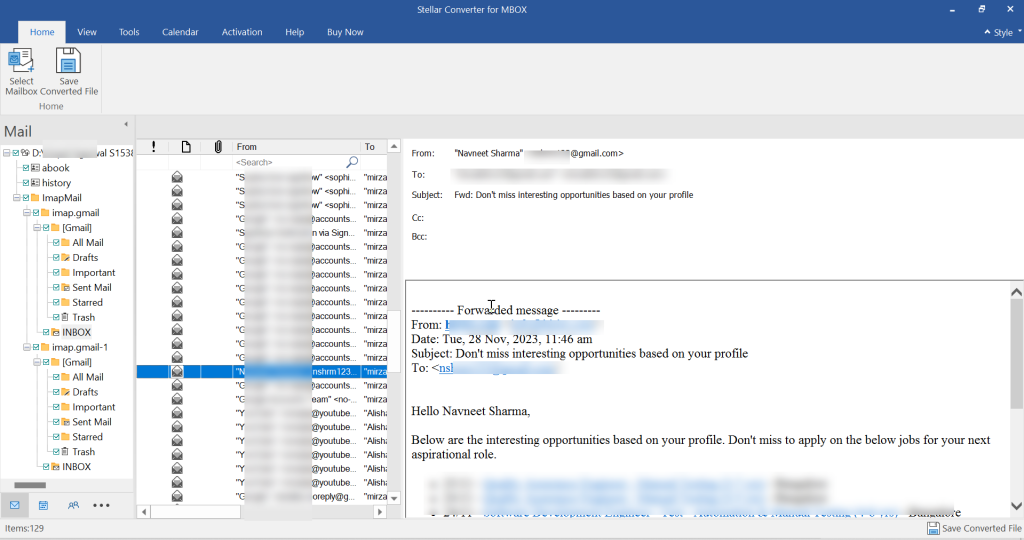
Preview-first workflows reduce “export and pray” migrations. Stellar Converter for MBOX explicitly emphasizes preview before saving and a structured preview layout.
2) Find + convert (useful when you don’t know where the MBOX is)
In real environments, users don’t know file paths. The guide highlights a “Find option” to locate mail files faster.
3) Filters for smarter cutovers
Filtering is underrated. Stellar’s comparison table mentions:
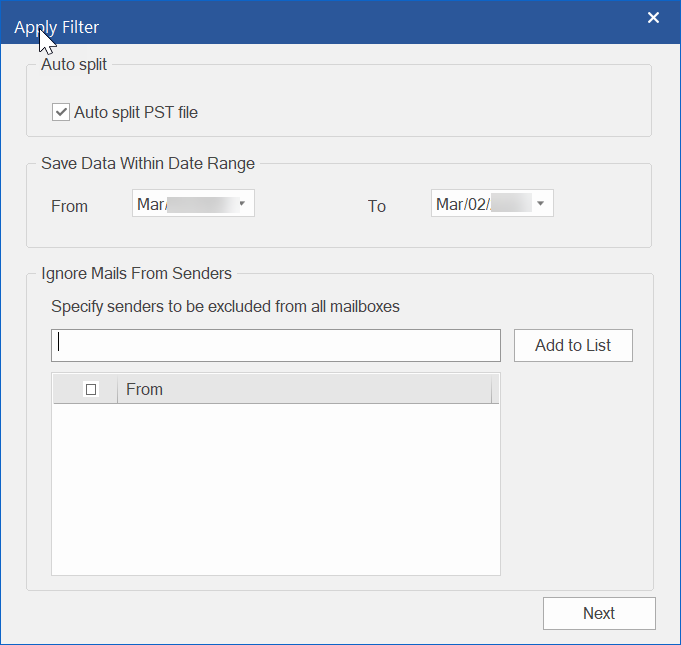
- Include/exclude by date range
- Exclude emails from specific senders
That’s extremely useful for:
- Partial migrations (“move last 24 months”)
- Legal holds / scoped exports
- Reducing PST bloat for performance
4) Auto-splitting PST at ~45GB
Large PSTs can become fragile and slow. Stellar’s guide mentions auto-splitting a new PST around ~45GB.
This is a very “IT-minded” feature—because it protects the end state (Outlook usability), not just the export step.
5) Log reporting (audit trail)
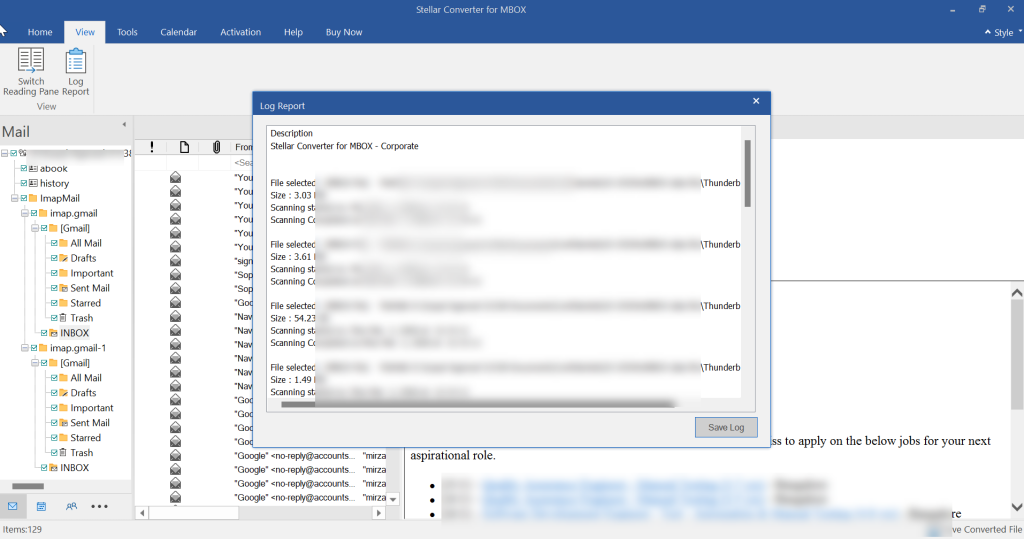
The guide calls out “View and Save Log Report.”
For business migrations, logs matter—especially when you need to prove what was migrated, what failed, and what was excluded.
System requirements & platform limitations
Windows-only (for the desktop app)
The product’s specs list 64-bit Windows 11/10/8.1/8 and 4GB RAM minimum (8GB recommended).
Outlook/Microsoft Office compatibility
The guide lists support for Microsoft 365 and Office versions up to 2024/2021/2019/2016/2013/2010.
Practical note: Even when tools say “Outlook not required for conversion,” the real operational question is: “Do we need Outlook installed to validate and use the PST?” Vendor FAQs commonly acknowledge Outlook is needed to open/view PST content in the normal way.
Demo/trial behavior (what you can test before paying)
Stellar indicates that the demo lets you preview converted mailbox data, but you typically need a paid license for full saving/export workflows.
SyncBricks recommendation: Treat the demo as a validation step:
- Confirm folder structure is detected correctly
- Confirm message counts look right
- Confirm attachments are visible in preview (where supported)
Then license only when you’re confident the mailbox parses cleanly.
Migration workflow (how to run it like a pro)
Here’s the “clean” approach I recommend for client or internal migrations:
- 1. Start with a known-good MBOX source. You get an option to select the “Email Client and mailbox.”
- Thunderbird profile export or Google Takeout MBOX are common sources.

- Thunderbird profile export or Google Takeout MBOX are common sources.
- Scan + preview
- Validate counts per folder (Inbox/Sent/Archive)
- Spot-check: dates, threading, attachments

- Decide your PST strategy, Click on “Save Converted File” option
- One PST per mailbox vs per year vs per department
- Use auto-split if mailbox is large.

- Apply filters (if needed)
- Date-range migrations (e.g., last 2 years)
- Exclude noisy senders/newsletters to reduce mailbox size.

- Export
- New PST or append to an existing PST depending on your target model.
- New PST or append to an existing PST depending on your target model.
- Post-export verification
- Compare source vs target folder counts (high-level)
- Sample-check attachments and calendar/task items if present (vendor claims support for mailbox items beyond emails).
- Import into Outlook / proceed to M365 ingestion
- If your goal is Microsoft 365, decide whether you’ll:
- Import PST via Outlook path, or
- Use Technician export workflows where applicable.
- If your goal is Microsoft 365, decide whether you’ll:
Strengths (what Stellar gets right)
- Broad MBOX ecosystem support (realistic coverage of legacy clients and Takeout).
- Preview-first workflow (reduces migration surprises).
- Operational controls: filtering, logging, PST splitting—these are the features you notice at scale.
- Clear tiering and accessible pricing for typical one-off migrations.
Limitations (where you should be careful)
- Windows dependency for the desktop tool (standard in this category, but still a constraint).
- Not a sync tool: this is about conversion/migration, not continuous mailbox synchronization (plan your cutover accordingly).
- Trial limitations: preview is useful, but expect paid license for actual export/saving.
Alternatives (when you might not need Stellar)
Depending on your scenario:
- Small mailbox + technical user: IMAP bridge or manual exports can work (but it’s time-heavy).
- Free conversion utilities: they exist, but often lack strong preview/logging/splitting and can be riskier for business-critical migrations.
- If your end goal is M365 tenant migration at scale: you may consider a broader migration suite—especially if you need automation, scheduling, and reporting.
SyncBricks take: Stellar sits in a strong middle ground—more reliable than “random free converter,” less complex than full migration platforms.
Who should buy it
Buy Corporate if:
- You have a single mailbox or small number of exports
- You only need PST conversion and controlled imports.
Buy Technician if:
- You handle migrations for others (IT/MSP/consulting)
- You need Office 365 export options and broader output flexibility.
Final recommendation
If you’re migrating from Thunderbird, Google Takeout MBOX into Outlook, Apple mail, other MBOX supported mail clients or converting MBOX to PST, Stellar Converter for MBOX is a solid, workflow-driven converter that focuses on the details that matter: preview, scope control, logs, and PST management. It’s not a “forever sync” product—and it doesn’t need to be. For one-time migrations and controlled transition projects, it’s a credible tool with pragmatic features and straightforward licensing.